Our Top Picks
The Insta360 X6 listing promises a lot in one title: an 8K 360 camera with two 1/1.1-inch sensors, a triple AI chip and a lens it calls Replaceable Lens 2.0. Is that enough to justify putting it on a shortlist? On paper, yes, because those are the specs that matter most in a 360 camera. But a title is a sales summary, and it leaves out weight, battery life, waterproofing, microphones and editing software, which are the things that decide whether you enjoy owning one. Nobody on our team has handled this camera, so this page works from the listing text and from general knowledge of how 360 cameras are used, and it flags what to confirm yourself.
Insta360 X6 at a glance

Insta360 X6, 8K 360 Camera with 1/1.1'' Sensors | Action Camera, Dual Custom Square 1/1.1" Sensors, Triple AI Chip, Replaceable Lens 2.0, 140 minutes 8K Video



As an Amazon Associate we earn from qualifying purchases. Product prices and availability are accurate as of the date/time indicated.

Insta360 X6 Essentials Bundle - 8K 360 Camera with 1/1.1'' Sensors | Action Camera, Dual Custom Square 1/1.1" Sensors, Triple AI Chip, Replaceable Lens 2.0, 140 minutes 8K Video
As an Amazon Associate we earn from qualifying purchases. Product prices and availability are accurate as of the date/time indicated.
| Item | What the listing title says |
|---|---|
| Product | Insta360 X6, 8K 360 camera, also described as an action camera |
| Sensors | Dual custom square 1/1.1″ sensors |
| Processing | Triple AI chip |
| Lens | Replaceable Lens 2.0 |
| Video | 8K, with “140 minutes 8K Video” stated in the title |
| Variants in this set | Standalone, and an “Essentials Bundle” |
| Price tier | Mid-range to premium among cameras of this type; the bundle sits a tier above the standalone |
Reading the title one claim at a time
“8K 360 Camera”. This is the most prominent claim, and also the one most often misunderstood. A 360 image wraps a full sphere, so the 8K frame covers every direction at once. When you pull a normal flat clip out of it, the resolution of that flat view is much lower than 8K. As a rough guide, if an 8K sphere is about 7,680 pixels across and you cut a 90-degree window, that window is on the order of 1,900 pixels wide, close to what a 1080p clip holds. That figure is an approximation, because the exact result depends on the projection and how the app crops. It is still worth knowing: high resolution in a 360 camera mostly buys you reframing headroom and a sharper full-sphere view.
“Dual Custom Square 1/1.1 inch Sensors”. Larger sensors usually gather more light, which helps in dim places. The title says the sensors are custom and square, which suggests the design is meant to use the lens image area efficiently. Beyond that, the title does not say how the camera handles low light, so treat it as a promising spec rather than proof.
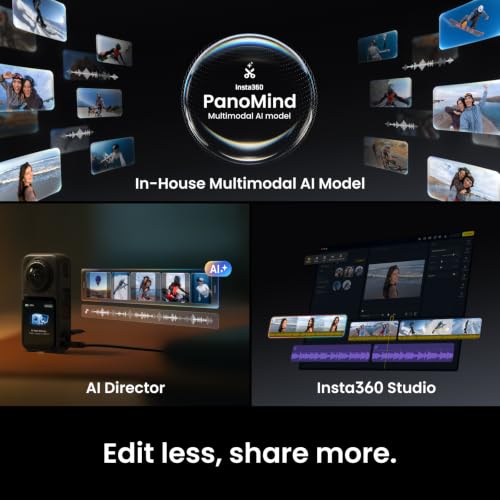
“Triple AI Chip”. Vendors use this kind of phrase for processors that handle stabilization, stitching and subject tracking. The title does not describe what the chips do, or whether the features are on the camera or in the app. Look for a feature list on the product page.
“Replaceable Lens 2.0”. Lenses on a 360 camera sit on the outside of the body, so scratches are a real worry. A replaceable lens design addresses that, but the title does not say what is replaceable, whether spares come in the box or what a replacement costs. Treat this as a question for the seller or the manufacturer’s page.
“140 minutes 8K Video”. This line is ambiguous. It could refer to the maximum recording time on a given card or to a battery-limited recording time. It is the seller’s claim, and it might hold only under specific settings. Ask which conditions the number comes from.
Who the Insta360 X6 suits
This is a camera for people who like to decide the shot after the shoot. If you ride a bike, ski or walk through a city and want to record everything around you, 360 capture means you do not need to aim. The camera records both directions, and you choose the framing later in an app. It also suits creators who want a mounted pole to disappear from the picture, a trick known as the invisible selfie stick that is standard in 360 cameras generally.
It also fits people who make virtual tour footage, travel vlogs or event recordings, where several people are in different places and you do not know where the action will be. Real estate walk-throughs and small-venue event coverage are other plausible uses, provided you are happy to spend time editing.
Who should skip it
Skip a 360 camera if you want to shoot and share the same day without editing. Reframing takes time, and files from high-resolution 360 video are large. If you only need a simple point-and-shoot clip of a ride or a hike, a single-lens action camera is quicker.
Skip it, too, if your computer or phone is older. Handling high-resolution 360 footage can be demanding, and the titles say nothing about the supported editing devices. And skip it if you worry about scratching the lenses and do not want to deal with replacements, since the exposed lens design is a feature of the category, not of this one model.
What the title does and does not tell you
The title gives you the sensor, the processor description, the headline resolution and the recording claim. It does not give you any of the following, which you should find on the product page before you buy:
- Battery capacity and realistic recording time at the settings you plan to use.
- Waterproof rating and whether a separate case is needed for diving or heavy rain.
- Frame rates at each resolution, and bitrates.
- Which memory cards are supported and the maximum capacity.
- Weight, size and whether it fits standard mounts.
- Microphone configuration and wind noise handling.
- App and desktop software requirements, and whether any features need a subscription.
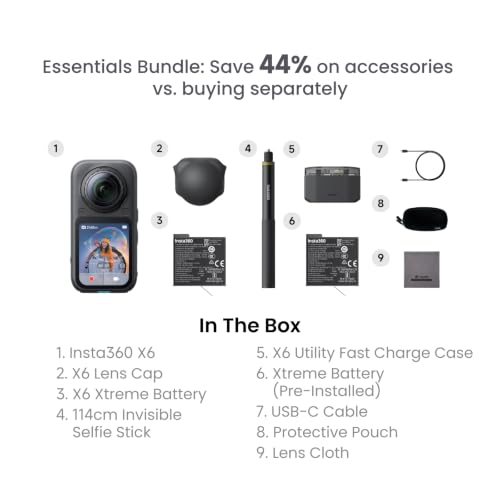
- What the Essentials Bundle adds to the standalone camera.
Questions to ask before you buy
- Is the listing for a new camera sold by an authorized seller, and does the warranty apply in my country?
- What is the maximum recording time at each resolution, with and without extra cooling?
- What does Replaceable Lens 2.0 mean in practice, and are spares included?
- Which phone or computer do I need to edit 8K 360 footage smoothly?
- Do I need a subscription or paid add-on for any editing feature I want?
- What is in the Essentials Bundle, and would I buy those items anyway?
How a 360 workflow usually goes
Owning a 360 camera changes how you spend your time. With a regular camera, most of the work happens while you shoot. With a 360 camera, a lot of it moves to the editing stage. This is general to the category, not a statement about one model, but it affects whether the camera suits you.
First comes capture. You mount the camera, start recording and forget about framing, though you still think about where the camera sits relative to the action and the sun. Second comes transfer, where files move from the card or over wireless to a phone or computer. With large files, wireless transfer can be slow, and many people prefer a cable or a card reader for long sessions.
Third comes stitching, in which the footage from both lenses is merged into one sphere. In current cameras this is mostly automatic, but the seam can show in close subjects or tricky light. Fourth is reframing: you pick angles, add keyframes and export a flat clip. This is the step that turns a 360 clip into something you can post. Expect to spend longer here than you would trimming a normal clip, particularly at first.
Finally comes export, where bigger projects can take a while on older devices. If you plan to publish the full 360 video, platform limits on resolution and file size will matter. None of this is hard, but it is a real time commitment, and it is the main reason some buyers drift back to simpler cameras.
Practical shooting notes for any 360 camera
A few habits help regardless of brand. Keep the lenses clean, because a fingerprint on a lens shows up across a large part of the frame. Carry a soft cloth, and treat the exposed lenses with the care the manufacturer describes.
Think about placement. A camera held too close to your face fills the frame with your head, while one mounted on a pole of moderate length gives the cleanest view. Keep it away from the exhaust of a vehicle and from heat, because high-resolution recording makes electronics warm and some cameras stop to protect themselves.
Watch the light. When the sun is on one side, one lens may see bright light and the other deep shade, which can leave a visible exposure difference between the halves. Overcast days are forgiving. Also remember sound: wind noise on a small microphone can ruin a good clip, and a windshield accessory or a separate recorder may help. Last, check battery and storage before you leave, and bring spares, since recording at the highest resolution uses both quickly. Follow the manufacturer’s instructions for charging and storing lithium batteries, and avoid leaving the camera in a hot car.
The only alternative in this set
The set contains only two listings, and both are the same camera. That means there are no rival models to compare in the usual sense, and we will not pretend otherwise. What you can decide is whether the standalone or the bundle suits you better.
Insta360 X6 Essentials Bundle
This listing repeats the standalone title word for word, with “Essentials Bundle” added after the product name. The bundle contents are not given, so the title cannot tell you what you are paying for. Bundles in this category often add a case, a card or a mounting pole, but that is general practice and we cannot say which of these, if any, are included.
Whether it makes sense depends on your accessories. If you already own a fast memory card, spare batteries and a pole, the standalone is the cleaner purchase. If you are starting from nothing, a bundle can save a trip to buy extras, provided the items are ones you would choose yourself.
- Pros: may save buying accessories separately; same camera specs as the standalone per the title; a convenient single purchase for a first-time buyer.
- Cons: contents are not stated in the title; sits in a higher price tier than the standalone; accessories may be lower quality than ones you would choose.
Check the listing for: a line-by-line contents list, warranty coverage on the accessories, and whether the items are sold separately at a lower combined price. Question to ask: which of the bundled items would I buy anyway?
Buying checklist
| Spec concept | What to look for | Why it matters |
|---|---|---|
| Resolution and frame rate | The modes that offer 8K and the frame rates available | Higher frame rates are often only available at lower resolutions |
| Sensor size | Stated sensor dimensions, low-light claims | Bigger sensors generally help in dim light |
| Lens protection | Replaceable lens or guard details, spare cost | Exposed lenses scratch easily |
| Battery and heat | Recording time at your chosen mode, heat warnings | High-resolution recording can stop early if the camera warms up |
| Storage | Supported card type and speed class | An unsupported card can interrupt recording |
| Software | App features, desktop software, subscription rules | Editing is where most of your time goes |
| Warranty and seller | Who ships, who supports the unit | Protection if the camera arrives faulty |
A quick way to compare the two variants
Open both product pages side by side and write down three things: the full list of items in the box, the seller name and the warranty terms. If the bundle includes items you would otherwise buy within a month, such as a large memory card and a protective case, subtract their separate prices in your head and see whether the gap between the two listings shrinks to something you accept. If the bundle contents are vague, treat it as the standalone camera and judge the extras as a possible bonus rather than a reason to pay a higher tier.
Worked example: how much storage do you need?
Because the titles give no bitrate, we use a planning assumption. Suppose 8K 360 video is recorded at about 200 megabits per second. That is a hypothetical figure for illustration, not a specification of this camera. At that rate, one minute of footage takes roughly 1.5GB, and an hour takes about 90GB.
The title mentions 140 minutes of 8K video. At the assumed bitrate, 140 minutes would need around 210GB. A 256GB card would hold roughly 170 minutes, a 128GB card around 85 minutes. A day of shooting could easily produce footage that fills two cards, and the files still need to be copied and backed up. So buy a large card, check the camera’s maximum supported capacity, and keep an external drive for transfers. If the real bitrate is higher or lower, scale these numbers accordingly.
Verdict
The Insta360 X6 listing is a strong set of spec claims for anyone who wants flexible, reframable video: large sensors, high-resolution capture and a lens design that appears to anticipate scratches. The headline numbers should be read with care. The 8K figure covers the whole sphere, the 140-minute claim has no stated conditions, and the title is silent about waterproofing, battery and software terms. If you want to choose the shot after the fact, it is a good candidate. If you want simple clips with minimal editing, a regular action camera is the easier option. Between the two listings, choose the bundle only if its contents match what you would buy anyway.
Related guides
- Black Friday Cyber Monday Health Equipment Deals
- Hanging Purse Organizer For Small Closet
- Closet Organizers For Small Closets
Frequently asked questions
Does the Insta360 X6 really record 8K video?
Both listings say “8K 360 Camera” and “140 minutes 8K Video”, which is the seller’s wording. Eight-K in a 360 camera spreads those pixels around a full sphere, so a normal flat clip cut from it has far fewer pixels than the number suggests. The title does not give frame rates, bitrates or which modes are available at 8K, so read the specification table on the product page before relying on the headline figure.
What is the difference between the standalone X6 and the Essentials Bundle?
The titles are the same except for the words “Essentials Bundle” in the second one. Neither title lists what the bundle contains, so you cannot tell from the title alone. Typical bundles add accessories such as a card, a case or a stick, but that is general practice, not a fact about this listing. Open the product page, compare the contents line by line and decide whether the extras are worth the price tier.
What does “Replaceable Lens 2.0” mean?
The title uses the phrase without explaining it. In 360 cameras, protruding lenses are exposed to scratches, so replaceable lens guards or lens assemblies are common selling points. The “2.0” suggests an updated design, but the title does not say whether it refers to a guard or the lens itself, or whether spares are included. Check the product page for the exact meaning and the cost of a replacement.
Do I need a fast memory card for 8K 360 video?
High-resolution 360 video produces large files, and cameras generally specify a minimum card speed rating. The titles do not name a card type, so read the manual or product page for the recommended class and maximum capacity. Buying a card from a reputable seller matters too, because counterfeit cards can fail mid-recording. Plan on a large card and a backup drive for transferred footage.
Is a 360 camera better than a normal action camera?
They solve different problems. A 360 camera records every direction, so you choose the framing afterward, and it can hide a mounting pole in the edit. A single-lens action camera records a fixed view with simpler editing and usually a higher-resolution flat image. If you want to point and shoot with minimal editing, a normal action camera is simpler. If you want to decide the angle later, 360 is the stronger fit.
Is it safe to use around water, dust or cold?
The titles do not state a waterproof rating, a dust rating or an operating temperature range, so do not assume any of them. Check the manufacturer’s page for the stated depth or protection class and whether an extra housing is needed. Batteries lose capacity in the cold, and lenses fog easily when moving between temperatures. Follow the manufacturer’s instructions for use near water, and rinse and dry the camera as they direct.