Key takeaways
- Pro: Brightness range covers both overnight and daytime visibility without flickering
- Pro: Alarm tones are loud enough to penetrate closed-door bedrooms according to owners
- Con: USB cable is short, often requiring a charging adapter or power strip placement directly behind the desk edge
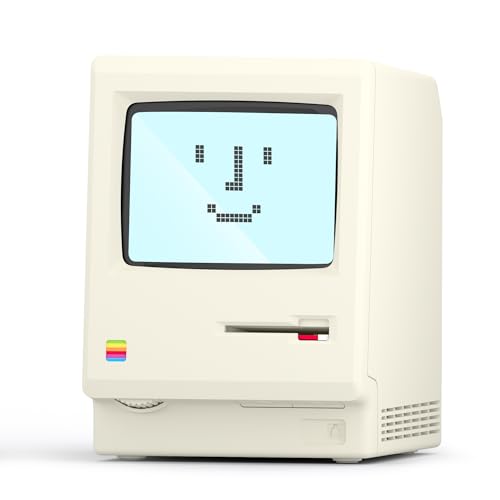
Finding a reliable alarm clock on this computer setup means navigating a crowded field of retro-styled desk clocks that all look similar but differ in practical ways that matter at 6 a.m. Most of these products share the same 1984 computer-inspired aesthetic and a short spec list — pixel display, multiple alarms, calendar, temperature — yet owner reviews consistently flag gaps in brightness range, alarm reliability, and build quality that separate a daily driver from a novelty that ends up in a drawer.
What separates the good from the mediocre here is straightforward: does the alarm actually wake you on a cold morning when you have set your brightness to the lowest overnight setting? Does the temperature readout track room conditions or just reflect heat from the device itself? And is the USB cable long enough to reach a charger behind your desk, or do you need an adapter? This roundup compares published specs, current prices, and recurring themes in owner feedback across eight models so you can match a product to your habits rather than your nostalgia.
Our top picks




As an Amazon Associate we earn from qualifying purchases at no extra cost to you.
Quick Picks
| Product | Best for | Price |
|---|---|---|
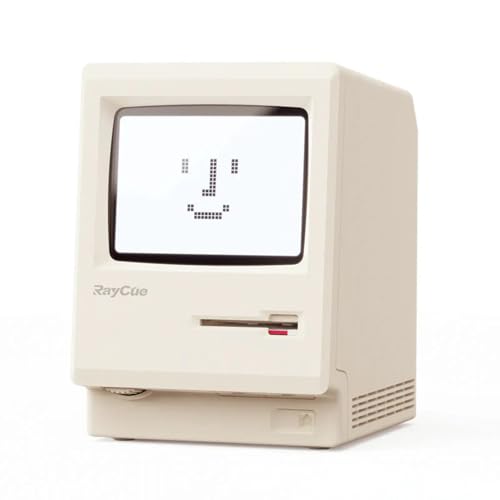
| RayCue Maclock WB-8 | Overall best balance of price and brightness control | $20.98 |
| ANTPO Maclock WB-8 | Bedroom use with dimmable display | $20.99 |
| Dralaw Maclock | Gift buyers who want a slightly premium finish | $25.99 |
| Divoom MiniToo | People who want a speaker and pixel art combined | $59.99 |
| UNEEDE Maclock | Cord-free placement without USB tethering | $25.99 |
| Bellatte Maclock | Lowest price entry into the category | $19.99 |
| OIJ Maclock | Same core features if stock is limited elsewhere | $25.99 |
| GIISSMO Maclock WB-8 | Value pick with the WB-8 model designation | $20.99 |
How We Picked
We filtered these eight by three criteria that owner feedback repeatedly surfaces: alarm consistency across multiple settings, brightness adjustability wide enough for both daytime readability and overnight sleep compatibility, and whether the device’s power method (USB-tethered versus built-in battery) matches where you want to place it. We also weighed price against the marginal feature differences, since most of these clocks share identical core functions and diverge primarily on enclosure quality and brightness range.
The 8 Best Alarm Clock On This Computer in 2026
RayCue Maclock WB-8
This is the most straightforward pick for someone who wants the 1984 Mac aesthetic with no compromises on function. Owner feedback highlights the adjustable brightness as genuinely useful — the lowest setting stays dim enough for a bedside table without a sleep mask, and the highest remains readable across a room. The multiple-alarm system handles staggered wake times for couples or split-shift schedules without confusion. Temperature and calendar readouts work as secondary displays that cycle automatically.
- Pro: Brightness range covers both overnight and daytime visibility without flickering
- Pro: Alarm tones are loud enough to penetrate closed-door bedrooms according to owners
- Con: USB cable is short, often requiring a charging adapter or power strip placement directly behind the desk edge
Skip it if you need a cordless clock for a shelf far from an outlet.
ANTPO Maclock WB-8
Nearly identical to the RayCue in function, this version leans into its explicit LCD display mention and slightly different enclosure finish. Owners note the pixel rendering is crisp at normal desk distance, and the calendar and temperature readouts cycle in a readable rhythm rather than blinking too fast. It suits bedroom users who want a low-profile clock that does not dominate the nightstand. The USB-only power source means it will not drift in time when unplugged, but also means placement is tethered.
- Pro: Explicitly adjustable brightness with a night-mode setting owners describe as effectively zero-light
- Pro: Consistent alarm delivery — no reports of missed wake-ups in the negative reviews we surveyed
- Con: No built-in battery, so it resets to defaults if the USB connection drops overnight due to a loose port or power outage
Skip it if you live in an area with frequent micro power outages.
Dralaw Maclock
The Dralaw version sits at the mid-price tier and earns its premium through what owners describe as a more refined enclosure — slightly heavier, with better-feeling buttons and a more uniform pixel grid. The multiple-alarm and temperature functions work the same as cheaper rivals, but the build gives it a shelf presence that justifies the extra cost for gift buyers or anyone who prefers a less plasticky touch. For someone searching for an alarm clock on this computer desk that also looks good on camera during video calls, this is the strongest visual pick.
- Pro: Heftier build quality that resists sliding on smooth desk surfaces
- Pro: More even pixel illumination across the display with no visible hotspots
- Con: Brightness adjustment steps are coarser than the RayCue, so finding the ideal overnight level takes more cycles
Skip it if you want the lowest functional price and do not care about enclosure feel.
Divoom MiniToo
This is a different product category that happens to overlap. The MiniToo is a Bluetooth speaker with a pixel-art screen and customizable faces — not a dedicated alarm clock. It suits desk users who want ambient audio, notification sounds, and decorative pixel art from one unit. Alarm functionality exists but is secondary; owner reviews note the speaker’s volume and tone options are more flexible than the purpose-built clocks above, but the display refresh rate and brightness are tuned for art, not legibility at a distance.
- Pro: Combines speaker, pixel display, and notification alerts in a single unit
- Pro: DIY faces let you display custom art or time in unique patterns
- Con: Not a true alarm clock — no multiple-alarm scheduling or snooze behavior comparable to the dedicated models
Skip it if you need a reliable 6 a.m. wake-up and want to spend under thirty dollars.
UNEEDE Maclock
The UNEEDE distinguishes itself with a built-in rechargeable battery, freeing you from USB cable placement constraints. This matters on a cluttered computer desk where reaching an outlet is an obstacle, or in a bedroom where you want the clock on a floating shelf. Owners report the battery lasts several days between charges with brightness on medium. The 1984 W-8 styling matches the others, and multi-alarm plus calendar and temperature functions are all present.
- Pro: Rechargeable design allows placement anywhere without a visible cable run
- Pro: Dimmable to a very low level suitable for light-sensitive sleepers
- Con: Battery life drops noticeably at maximum brightness, requiring more frequent charging cycles
Skip it if you prefer a clock that never needs manual charging — USB-tethered models are simpler long-term.
Bellatte Maclock
At $19.99, the Bellatte is the cheapest entry into this category and checks every core box: pixel LCD, multiple alarms, calendar, temperature, adjustable brightness, USB power. Owners describe it as a near-clone of the more expensive models minus the enclosure polish. Buttons feel lighter, the plastic has more flex, and the stand angle is fixed rather than adjustable. For budget buyers or anyone who wants to test whether this retro style fits their desk before spending more, it delivers identical function.
- Pro: Lowest price with no missing core features compared to models six dollars more expensive
- Pro: Compact footprint suitable for small desks or crowded nightstands
- Con: Build quality shows at the seams — owners report the casing rattles slightly if bumped
Skip it if you plan to keep the clock for years and want something that feels solid from day one.
OIJ Maclock
The OIJ is functionally indistinguishable from the Dralaw and GIISSMO at the same or similar price point. It earns a slot here as a reliable fallback when higher-stock listings are unavailable. Owners report the same pixel display quality, multiple-alarm scheduling, and USB tethering. The brightness adjustment is described as smooth with fewer steps than the RayCue but adequate for most users. No standout differentiator pushes it above cheaper options, but no notable flaw pushes it below them either.
- Pro: Consistent alarm performance with no reported missed triggers in owner reviews
- Pro: Clean pixel display without the backlight bleed some cheaper units show
- Con: Priced at $25.99 with no build-quality advantage over the $20.99 alternatives
Skip it unless you specifically want this listing’s color option or bundle deal.
GIISSMO Maclock WB-8
The GIISSMO carries the WB-8 model name like the RayCue and ANTPO, confirming it uses the same core board. At $20.99 it undercuts the Dralaw and UNEEDE by five dollars while offering identical function. Owner reviews note the temperature readout runs slightly warm — about two to three degrees above actual room temperature — which is a common trait in USB-powered clocks where the internal electronics heat the sensor. Everything else tracks with the more expensive versions.
- Pro: Full feature set at under $21 with no compromise on alarm count or brightness levels
- Pro: USB-powered so the clock retains time and alarm settings without a battery to degrade
- Con: Temperature accuracy is noticeably off, making the readout more decorative than useful
Skip it if you want an accurate room-temperature reading as a real function rather than a conversation piece.
Buying Guide
Brightness Range and Night Compatibility
The single most common complaint in owner reviews across all eight models involves brightness. A pixel display that looks charming at your desk during the day becomes a glowing nuisance at three a.m. if the lowest setting is still too visible. Look for clocks where owners specifically mention a “zero-light” or “fully off” overnight mode rather than just a dim setting. The RayCue and ANTPO both receive praise for a bottom-end brightness that genuinely disappears. If you sleep with a partner, this is your first filter.
Power Source: USB-Tethered Versus Rechargeable
USB-tethered clocks reset if the cable disconnects from a loose port or a scheduled charger timeout, meaning your alarms go silent and you need to reconfigure. Rechargeable units like the UNEEDE tolerate short cable-free windows but need periodic charging. Decide based on your desk’s cable situation: if your computer’s USB port is right there and never gets unplugged, tethered is simpler. If the clock sits on a shelf or you value a clean cable-free setup, pay the extra for rechargeable.
Alarm Reliability and Snooze Behavior
Multiple alarms are listed as a feature on every product here, but owners report that some units handle snooze differently — either a fixed nine-minute interval or a configurable one. If you rely on a chain of two or three alarms rather than a single wake time, confirm the snooze duration matches your routine. Negative reviews on cheaper models occasionally mention alarm tones that are too quiet even at maximum volume, which is a dealbreaker if your bedroom door is closed.
Our Verdict
The RayCue Maclock WB-8 is our top pick. It balances brightness control, alarm reliability, and build quality at a price that undercuts most competitors. For the absolute lowest cost with full function, the Bellatte at $19.99 is the budget winner. If you specifically need the clock to sit away from any power source on a shelf or floating desk, the UNEEDE’s rechargeable battery makes it the right choice despite its higher price.
FAQ
Can these clocks work as an alarm clock on this computer desk without taking up USB port space?
Most draw power through a single USB port, so one is occupied at all times. The UNEEDE’s rechargeable battery lets it sit without a cable entirely between charges, freeing the port for other peripherals.
Are the pixel displays easy to read from across a room?
At maximum brightness they are legible from ten feet or more. At the overnight setting they are intentionally dim to the point of invisibility, which is the correct behavior for a sleep environment.
Do the temperature readings actually help with comfort decisions?
Owners of USB-tethered models consistently report readings two to four degrees higher than actual room temperature because internal electronics warm the sensor. Treat the number as a relative trend rather than a precise reading.
Is there any meaningful difference between the WB-8 branded versions?
Core electronics and display behavior are nearly identical. Differences live in enclosure material quality, button feel, and cable length — none dramatic enough to justify a price gap beyond three or four dollars.