Our Top Picks
 Epson FastFoto FF-680W High-Speed Duplex Photo and Document6.7 x 11.7 x 6.9 inches8.2 poundsCheck on Amazon
 ScanSnap iX2500 Photo Edition Wireless or USB High-Speed6.26 x 11.5 x 6.34 inches7.7 poundsCheck on Amazon
 Canon CanoScan LiDE 400 Slim Scanner7.7" x 14.5" x 0.4"14.5 x 9.9 x 1.7 inches3.6 PoundsCheck on Amazon

The best photo scanner for most people with a shoebox of prints is the Epson FastFoto FF-680W. Its duplex automatic document feeder takes a stack of photos in a single pass, captures the handwritten notes on the back of each print at the same time, and its software adds color restoration, red-eye cleanup and automatic year-based file naming — which is what turns a multi-weekend project into an afternoon one. If your archive is almost entirely 4 x 6 inch prints and you want the shortest possible path from box to folder for a few hundred images, the Plustek ePhoto Z300 does the job for less. If image quality per print matters more than speed and you don’t mind feeding one sheet at a time, a 4800 dpi flatbed like the Canon CanoScan LiDE 400 or Epson Perfection V39 II gives you more control for a budget price. One honest caveat before you buy: none of the eight scanners here handles 35 mm slides or negatives out of the box. That job needs a film-capable flatbed with a built-in transparency unit, or a dedicated film scanner, and the section on film below explains what to look for.
Top 3 Picks
Best overall: Epson FastFoto FF-680W
The FF-680W is the only scanner in this group built specifically for a real print archive rather than a handful of photos. It feeds a stack of prints through a duplex ADF at a rated speed of about 45 photos per minute at 300 dpi, scans both sides in one pass so you keep the notes on the back, and pairs with FastFoto software that restores faded color and names files in a sensible chronological order. It suits anyone with 500 prints or more, or anyone who also wants to digitize receipts, letters and documents with the same machine.
Best budget: Canon CanoScan LiDE 400
At the budget tier, the LiDE 400 is the pick because it delivers true 4800 x 4800 dpi optical resolution, runs from a single USB-C cable with no power brick, and is slim enough to stand on a shelf between uses. It is slower per print than any sheetfed model and it can only handle one original at a time, but for a few hundred prints and everyday documents it costs a fraction of a premium ADF scanner and gives you more manual control over the result.
Best premium: ScanSnap iX2500 Photo Edition
If your digitizing job is half photos and half paperwork, the iX2500 Photo Edition is the strongest single-device answer: a high-speed duplex ADF, a color touchscreen with one-touch profiles, wireless or USB connection, and ScanSnap Home software that handles OCR, date-based folder structures and cloud destinations. The Photo Edition bundle adds carrier sheets that protect small, delicate or oddly shaped originals. It is the most expensive way to scan prints here, and worth it only if you will genuinely use the document side too.
Quick Comparison
| Product | Best for | Key specs | Price tier |
|---|---|---|---|
| Plustek ePhoto Z300 | Fast single-print batches of 4 x 6 prints | CCD sensor; about 2 sec per 4 x 6 at 300 dpi; 600 dpi optical; single-sheet feed; no film support | Mid-range |
| Epson FastFoto FF-680W | Large print archives, both sides at once | Duplex ADF; rated up to about 45 photos/min at 300 dpi; 600 dpi optical; 48-bit color input; Wi-Fi and USB | Premium |
| ScanSnap iX2500 Photo Edition | Mixed photo and document workflows | Duplex ADF; 60 ppm-class color duplex; color touchscreen; Wi-Fi or USB; carrier sheets included | Premium |
| Canon CanoScan LiDE 400 | Budget flatbed with a tiny desk footprint | 4800 x 4800 dpi optical; 48-bit input; single USB-C cable; about 8 sec for a letter page at 300 dpi; 7.7 x 14.5 x 0.4 in as listed | Budget |
| Epson Perfection V19 II | Simple, occasional single-page scanning | 4800 dpi optical; 48-bit input; USB-powered; letter/A4 flatbed; no film adapter | Budget |
| AMBIR Photo Scanner + Cleaning Kit | Small batches with print cleaning included | 300/600 dpi; auto crop and deskew; single-sheet feed; photo cleaning kit bundled | Mid-range |
| Epson Perfection V39 II | Cloud-bound flatbed scanning | 4800 dpi optical; 48-bit input; vertical storage stand; one-touch buttons; letter/A4 flatbed | Budget |
| HP HPPS100 | Portable, occasional one-sided scanning | Single-sided sheetfed; USB-powered; 600 dpi class; compact travel size; no duplex, no ADF tray | Mid-range |
How We Chose
This roundup is built from published manufacturer specifications, the way each scanner is actually used in a home archive, and the upgrade path a buyer would follow if their needs grow. We weighted four things. First, optical resolution and sensor type, because a real 4800 dpi flatbed and a 600 dpi sheetfed scanner solve different problems, and interpolated numbers on a box mean nothing. Second, category fit: a scanner designed for stacks of prints behaves very differently from one designed for a single page, and both are correct answers for different archives. Third, the use case itself — how many prints you own, whether you need the backs of photos, whether documents are also part of the job, and how much desk space you can surrender permanently. Fourth, the upgrade path: whether the software and hardware let you grow into a larger project without replacing the machine, and whether consumables like rollers, carrier sheets and cleaning supplies are available and cheap. We did not run our own tests and we do not own these units; where a manufacturer does not publish a figure, we describe the specification class rather than guessing at a number.
1. Plustek ePhoto Z300 – Best for Fast 4×6 Print Batches
As an Amazon Associate we earn from qualifying purchases at no extra cost to you.
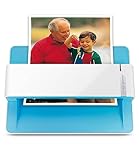
The ePhoto Z300 is for the person whose archive is overwhelmingly 4 x 6 inch prints and who wants them digitized this weekend rather than next month. It is a single-sheet, feed-through scanner built around a CCD sensor rather than the contact image sensor used in most inexpensive flatbeds, and Plustek rates it at roughly two seconds per 4 x 6 inch photo at 300 dpi. You feed one print at a time, the bundled software crops, straightens and color-corrects it, and the file lands in a folder you choose. There is no automatic document feeder, no transparency unit and no slide holder. This is a prints-and-paper machine, and it is very good at exactly that.
Key specs
- Sensor: CCD (charge-coupled device), which generally reproduces subtle gradients on faded prints better than the CIS sensors common at this price
- Speed: about 2 seconds per 4 x 6 inch photo at 300 dpi
- Optical resolution: up to 600 dpi
- Feed: single-sheet manual feed, one original at a time
- Media: loose prints and documents up to roughly 8.5 x 11 inches
- Output: JPEG or PDF with automatic crop, deskew and color adjustment
- Power: over USB from the computer
- Film and slides: not supported
The strongest argument for the Z300 is the arithmetic. At two seconds per print, a 1,000-print archive is about 33 minutes of pure scanning time. Add five to six seconds per print for pulling it out of the box, checking it, feeding it and stacking it, and the realistic total is somewhere around two hours of work — an evening, not a season. A flatbed at eight seconds per print plus handling turns the same job into a four-hour session. That gap is the whole reason feed-through photo scanners exist.
The CCD sensor is the second reason. Photo prints are continuous-tone objects with fine grain and gentle gradients in skies, skin and shadows, and a CCD array with its deeper optical path tends to hold those transitions better than a thin CIS module. On a faded 1970s print, that difference shows up as smoother color ramps rather than banding. It will not rescue a badly damaged photo, but it gives the auto-correction routines in the software more to work with.
The bundled utility is utilitarian rather than elegant. It handles auto crop, deskew, rotation and basic color adjustment, and it can scan straight to a folder or a PDF. What it does not do is Epson-style automatic naming by year, red-eye removal or one-click color restoration of the kind that makes a large archive manageable. If your plan is “scan everything into one folder and sort it later,” that is fine. If your plan is a well-organized family archive, plan on a separate renaming pass.
Pros
- About two seconds per 4 x 6 print, the fastest per-print rate in the budget and mid-range part of this list
- CCD sensor handles faded prints and smooth gradients well
- Compact and light, so it lives on a shelf and comes out when needed
- Auto crop and deskew mean very little manual correction per image
- Simple enough that a non-technical family member can use it without instruction
Cons
- No automatic document feeder: every print is fed by hand
- 600 dpi ceiling, so no extreme enlargement of small details
- No film, slide or negative support of any kind
- Curled or brittle prints can skew slightly and need a second attempt
- Software is basic compared with Epson FastFoto or ScanSnap Home
Against its nearest alternative here, the Epson FastFoto FF-680W, the Z300 loses on throughput and software but wins on price tier and simplicity. The FF-680W scans both sides of a print in one pass and handles a stack unattended; the Z300 needs you standing there for every sheet. If your archive is under roughly 300 prints, that difference is a couple of evenings. If it is 3,000 prints, the FF-680W pays for itself in your time.
2. Epson FastFoto FF-680W – Best for Large Print Archives

The FastFoto FF-680W is the scanner you buy when the box of prints is measured in thousands. It is a desktop sheetfed scanner with a duplex automatic document feeder, which means it pulls a stack of photos through, scans the front and the back in a single pass, and keeps going while you do something else. Epson rates it at up to about 45 photos per minute at 300 dpi. It is the best overall pick in this roundup because it is the only model here that treats a large print archive as the primary job rather than a side effect of document scanning.
Key specs
- Duplex automatic document feeder: scans both sides of a print in one pass, capturing handwritten notes and dates on the back
- Rated speed: up to about 45 photos per minute at 300 dpi
- Optical resolution: 600 dpi
- Color: 48-bit color input, 24-bit output
- Media: small wallet-size prints up to 8.5-inch-wide pages, plus standard documents
- Connectivity: Wi-Fi and USB, with scan-to-cloud, email and folder destinations
- Software: Epson FastFoto with auto-enhance, color restoration, red-eye reduction, rotation and year-based automatic naming; Epson ScanSmart for documents
- Film and slides: not supported; no transparency unit
The feature that separates the FF-680W from every other scanner here is duplex photo scanning. Family prints very often carry a date, a name or a location in pencil or ink on the reverse, and that metadata is frequently more valuable than the image itself. A single-sided scanner forces you to flip each print and run it through twice, which doubles your handling time and your error rate. The FF-680W captures both sides in one pass, and the software can be configured so the back-of-photo scans land in a companion folder rather than cluttering the main archive.
FastFoto software is the second differentiator. Color restoration pulls faded prints back toward their original saturation, auto-enhance adjusts exposure and contrast, and the automatic naming routine builds filenames with a year prefix and a sequential number, which is the single most useful thing any scanner can do for a disorganized archive. There is also a rotation step that detects whether a photo was fed sideways and corrects it. The document side is handled by Epson ScanSmart, which adds OCR, searchable PDF output and cloud destinations, so the same machine handles the shoebox of receipts that always accompanies a shoebox of photos.
Two operational realities are worth knowing before you buy. First, an ADF is not kind to every original. Prints that are heavily curled, mounted on thick card, torn, or coated in a sticky residue can jam or be scratched, and the standard practice is to set those aside and scan them one at a time on a flatbed. Second, roller cleanliness directly determines image quality. A dusty pick roller leaves fine vertical streaks across prints, which is the most common complaint about any ADF photo scanner and the easiest to prevent with a lint-free wipe every few hundred scans.
Pros
- Duplex scanning captures both the image and the notes on the back in one pass
- About 45 photos per minute turns a 1,000-print archive into roughly 25 to 35 minutes of scanning
- FastFoto software restores color and names files by year automatically
- Handles documents, receipts and letters with OCR alongside photos
- Wi-Fi connectivity lets you scan to a computer or cloud folder without a cable run
Cons
- Premium tier pricing, the highest in this group alongside the ScanSnap iX2500
- Curled, torn or thick-mounted prints must be scanned separately
- No film, slide or negative support
- Auto-enhance can over-saturate prints that were already in good condition
- Needs a permanent patch of desk roughly the size of a small printer
Its nearest rival here is the ScanSnap iX2500 Photo Edition. Both are premium duplex ADF scanners. The FF-680W is the better choice when photos are 80 percent of the job, because its software is photo-first: color restoration, red-eye and year-based naming are built in rather than bolted on. The iX2500 is the better choice when photos and documents are roughly equal, because its touchscreen profiles, OCR and cloud integration are more polished on the document side. Against the Plustek ePhoto Z300, the FF-680W is faster, more automated and considerably more expensive, and for an archive under a few hundred prints the Z300 is the better value.
3. ScanSnap iX2500 Photo Edition – Best for Mixed Photo and Document Workflows

The ScanSnap iX2500 Photo Edition is the pick for the household that needs one machine to handle both a photo collection and the ongoing paper tide of bills, school forms and receipts. It is a high-speed duplex sheetfed scanner with a color touchscreen, wireless or USB connection, and ScanSnap Home software that turns scanning into a set of one-touch profiles. The Photo Edition bundle adds carrier sheets, which are clear plastic sleeves that let you feed small, thin or delicate originals through the ADF safely. It is the most expensive route to digitized photos in this roundup, and it earns that only if you will use the document side regularly.
Key specs
- Duplex automatic document feeder with high-speed color duplex scanning in the 60 ppm class
- Optical resolution: 600 dpi class
- Color touchscreen for one-touch scan profiles
- Connectivity: Wi-Fi and USB; scan to computer, cloud services and mobile devices
- Software: ScanSnap Home with profile-based workflows, OCR, automatic date-based folder structures, receipt handling and searchable PDF output
- Photo Edition bundle: carrier sheets for small or delicate originals, plus photo-oriented presets
- Film and slides: not supported; carrier sheets are for paper originals, not film strips
The touchscreen is more than a gimmick on a shared machine. Each profile can be configured once — “photos to the archive folder,” “receipts to the expenses folder,” “documents to searchable PDF” — and after that anyone in the house can drop a stack in the feeder and press one button. On a scanner without a screen, changing the destination means walking to the computer and changing a setting, which is exactly the kind of friction that stops a digitizing project halfway through.
ScanSnap Home’s strongest feature for photo work is its automatic organization. It reads the scan date, groups items into folders, applies OCR where text is present, and can push files to cloud storage or a mobile device without a desktop round trip. For a mixed archive, this means the same machine that digitizes a stack of birthday photos also files a stack of utility bills as searchable PDFs in the right folder. That consolidation is worth a lot if you were otherwise going to buy a photo scanner and a document scanner.
Carrier sheets deserve a specific mention because they solve the ADF’s biggest weakness. A print that is curled, creased, torn or mounted on stiff card will often jam a document feeder. Sliding it into a carrier sheet gives it a uniform thickness and a clean leading edge, and it comes out the other side unharmed. The tradeoff is speed: loading a carrier sheet takes longer than dropping a print in bare, so reserve it for the originals that need protection. Carrier sheets are also a consumable — they pick up dust and scratches over hundreds of passes and eventually need replacing.
Where the iX2500 gives ground is on photo-specific image processing. ScanSnap Home will scan a photo faithfully and organize it well, but it does not offer the same depth of color restoration, red-eye reduction and one-click enhancement that Epson’s FastFoto software does. If your prints are faded and you want the scanner to do the correction work, that gap matters. If your prints are in decent condition and you mainly need them captured, filed and backed up, it does not.
Pros
- One device covers photos, receipts, contracts and everyday paperwork
- Touchscreen profiles make scanning a one-press operation for anyone in the house
- Wireless connection and cloud destinations reduce cable clutter
- Carrier sheets protect delicate originals from the feeder
- ScanSnap Home’s automatic folder and naming structure suits large mixed archives
Cons
- Premium tier pricing, and the Photo Edition bundle costs more than the base scanner
- Photo enhancement tools are thinner than Epson FastFoto’s
- Carrier sheets slow down batches and wear out over time
- No film, slide or negative support
- Software ecosystem pushes toward cloud features, which not everyone wants
Compared with the Epson FastFoto FF-680W, the iX2500 wins on document handling, touchscreen convenience and cloud integration, and loses on photo restoration and automatic chronological naming. The deciding question is simple: if 80 percent of your scanning is photos, buy the FF-680W; if it is closer to 50/50, buy the iX2500. Compared with the budget flatbeds below, it is a different category of machine entirely — faster and more automated, at three or four times the cost.
4. Canon CanoScan LiDE 400 – Best Budget Flatbed for Everyday Prints

The CanoScan LiDE 400 is the best budget flatbed here because it delivers genuine 4800 x 4800 dpi optical resolution in a body slim enough to stand upright on a shelf, and it runs from a single USB-C cable with no power adapter. It is for the reader who has a few hundred prints, wants the highest quality per image rather than the fastest throughput, and does not want a machine occupying a permanent square foot of desk. It handles documents, book pages and flat artwork just as happily as photos.
Key specs
- Type: flatbed with CIS sensor
- Optical resolution: 4800 x 4800 dpi
- Color: 48-bit color input, 24-bit output
- Speed: roughly 8 seconds for a letter-size color page at 300 dpi
- Power and data: a single USB-C cable, no separate power brick
- Dimensions: listed at 7.7 x 14.5 x 0.4 inches, one of the slimmest flatbeds available
- Controls: four front-panel EZ buttons for PDF, auto scan, copy and send
- Software: Canon IJ Scan Utility and ScanGear, with automatic document type detection and dust reduction options
- Film and slides: not supported; no transparency unit
The headline number is the 4800 dpi optical resolution, and it is worth understanding what it buys you. A 4 x 6 inch print scanned at 600 dpi produces a 2400 x 3600 pixel file, about 8.6 megapixels — enough for a high-quality reprint at the original size or a modest enlargement. Scan the same print at 1200 dpi and you get a 4800 x 7200 pixel file, roughly 34.6 megapixels, which is far more than the print itself contains. Most photographic prints resolve somewhere around 300 dpi of real detail, so 600 dpi captures essentially everything and 1200 dpi mainly captures grain and file size. The LiDE 400’s high optical ceiling is more useful for small originals — a stamp, a coin-sized photo, a detail you want to enlarge — than for standard prints.
The single-cable design is a genuine practical advantage that rarely appears in spec tables. There is no wall adapter to lose, no second outlet to find, and the scanner can travel in a laptop bag if you occasionally need to scan away from home. Combined with the slim body, it means the machine can live in a drawer or on a shelf and come out for a session, rather than occupying desk space permanently the way a full-size ADF scanner must.
Canon’s software is competent and unobtrusive. IJ Scan Utility detects whether you have placed a photo or a document and picks sensible defaults; ScanGear exposes the manual controls — resolution, color mode, descreening for halftone prints, and a software dust reduction filter. That descreening option matters more than people expect: scans of prints made from magazine pages or older halftone processes can show a visible dot pattern at high resolution, and a descreen pass removes it. The dust reduction filter smooths specks but also softens fine detail, so it is best used lightly.
The honest limitation is throughput. At roughly eight seconds per scan plus five or six seconds of handling, a 1,000-print archive is close to four hours of continuous work. That is fine for a 200-print box and unreasonable for a 5,000-print one. A flatbed also requires you to position each original squarely on the glass, and a print placed at an angle needs correcting afterward, which adds a step the software cannot fully automate.
Pros
- True 4800 x 4800 dpi optical resolution at a budget tier
- Single USB-C cable for both power and data
- Extremely slim and easy to store upright
- Handles photos, documents, book pages and flat artwork equally well
- Manual controls including descreening for halftone originals
Cons
- One page at a time; roughly four hours for a 1,000-print archive
- No automatic document feeder and no duplex
- No film, slide or negative support
- Software dust reduction softens fine detail rather than removing dust optically
- CIS sensor has limited depth of field, so curled originals can blur at the edges
Its closest competitors here are the Epson Perfection V19 II and V39 II, which share the same 4800 dpi optical class. The LiDE 400 wins on slim