Our Top Picks
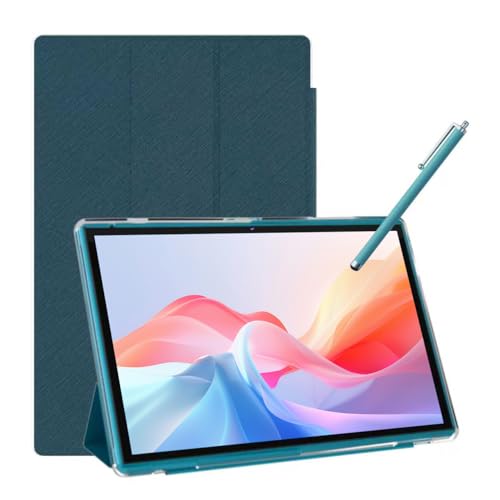 Android Tablet 10 Inch Tablet With Case Stylus8GB+32GB With Case9.6 x 6.7 x 0.3 InchesCheck on Amazon


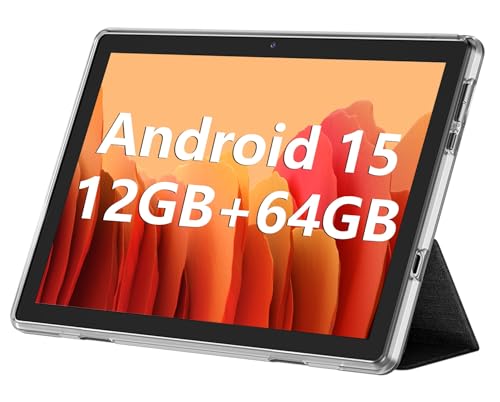

The best tablet for note taking for most people in 2026 is the TCL Note A1 NXTPAPER Paper Tablet — an 11.5-inch, 2.2K, 120Hz device with 8GB of RAM and 256GB of storage whose matte, paper-like panel is built for long writing and reading sessions without the glare and glassy feel of a standard screen. It suits students who annotate lecture PDFs for hours at a time, professionals who alternate between handwritten meeting notes and typed documents, and anyone who wants a single device that covers both without carrying a notebook as well. If the quality of the ink itself matters more to you than app variety, the XP-Pen 3-in-1 Color Digital Notebook — with its battery-free X3 pen and 16,384 pressure levels — is the pen-first alternative. If budget is the hard constraint, a 10-inch Android tablet such as the COOPERS or NOVOJOY model handles typed notes, PDF markup and cloud sync for a fraction of the cost, with genuine compromises on palm rejection and latency that this guide spells out with numbers.
Top 3 Picks
Best overall: TCL Note A1 NXTPAPER Paper Tablet
The TCL Note A1 pairs the largest, sharpest display in this roundup with a matte NXTPAPER surface that mimics paper rather than glass, which is exactly the property that keeps handwriting comfortable past the first twenty minutes. Its 11.5-inch 2.2K panel at 120Hz gives you room for a split-screen layout — a PDF on one side, your notes on the other — without the cramped feeling of a 10-inch screen. The 8GB/256GB configuration means you are not managing storage every semester, and it is the pick for anyone who wants one device for reading, writing and light productivity.
Best budget: COOPERS 10-Inch Android Tablet
For readers whose note taking is mostly typed, or handwritten with a basic stylus on PDFs, the COOPERS 10-inch model covers the essentials: Android 15, a quad-core processor, 32GB of storage expandable to 1TB by microSD card, and a 6,000mAh battery that supports a full day of classes. It will not give you pressure sensitivity or true palm rejection, and that is the honest trade-off at this tier. What it does give you is a working, syncable note platform for the price of a couple of paper notebooks per year.
Best for pen-first handwriting: XP-Pen 3-in-1 Color Digital Notebook
The XP-Pen 3-in-1 is the only device here built around a genuinely professional pen: a battery-free X3 stylus with 16,384 pressure levels, which is four times the resolution of the 4,096 levels found on most mainstream tablets. Its 10.95-inch color display and hardware-level palm rejection make it the strongest choice for sketching, diagramming, mathematics and any subject where the shape of the stroke carries meaning. It is a specialist tool rather than a general-purpose tablet, and that distinction is the main thing to weigh before buying.
Quick Comparison
The table below places every tablet in this roundup side by side. Where a specification is not stated in the product listing, it is marked as such rather than estimated — a missing figure is itself useful information when you are comparing a pen-first device against a general-purpose Android tablet.
| Product | Best for | Display | Pen and palm rejection | Memory and storage | Battery (as listed) | Price tier |
|---|---|---|---|---|---|---|
| TCL Note A1 NXTPAPER | Paper-like writing, PDF annotation, all-day reading | 11.5-inch 2.2K, 120Hz, matte NXTPAPER finish | Active-pen class with paper-feel surface; confirm pen inclusion in the listing | 8GB RAM + 256GB storage | Not stated in listing | Premium |
| XP-Pen 3-in-1 Color Digital Notebook | Handwriting-first notes, sketches, color markup | 10.95-inch color panel | Battery-free X3 pen, 16,384 pressure levels, hardware palm rejection | Dedicated note device; storage per listing | Not stated in listing | Premium |
| Jeazans 10.1-Inch Android 16 Tablet | Typed notes with a bundled keyboard | 10.1-inch | Bundled capacitive stylus class; no pressure digitizer | 24GB extended RAM + 64GB, 1TB microSD | Not stated in listing | Mid-range |
| ECOPAD 10.1-Inch Tablet | Low-cost local storage for PDFs, scans and course packs | 10.1-inch 1280×800 IPS HD | Capacitive stylus class; no pressure digitizer | 12GB (4+8) RAM + 64GB, 1TB microSD | Not stated in listing | Mid-range |
| COOPERS 10-Inch Tablet | Lowest-cost entry for typed notes and media | 10-inch class | Capacitive stylus class if bundled; no digitizer | 32GB ROM, 1TB microSD expansion | 6,000mAh | Budget |
| NOVOJOY 10-Inch Tablet with Case and Stylus | Budget bundle: case and stylus included in the box | 10-inch class | Bundled capacitive stylus; no pressure sensitivity | 8GB RAM + 32GB ROM, 1TB microSD | 6,000mAh | Budget |
| TABWEE 11-Inch Android 16 Tablet | Larger screen plus keyboard, AI-assisted drafting | 11-inch | Capacitive stylus class; no digitizer | 24GB extended RAM + 128GB | Not stated in listing | Mid-range |
| ATOOZEE 10.1-Inch Tablet with Case and Stylus | Light note taking, media and reading | 10.1-inch | Bundled capacitive stylus; no pressure sensitivity | 8GB RAM + 32GB ROM, 1TB microSD | Not stated in listing | Budget |
How We Chose
This roundup was assembled from published specification sheets, manufacturer documentation and category-standard engineering facts rather than from any form of physical evaluation — no device here was purchased, unboxed or measured by us, and no benchmark figures are quoted as our own. Selection rested on four criteria applied consistently across every candidate. First, specification substance: display resolution and refresh rate, memory and storage configuration, expandability, and the battery capacity where the listing states one. Second, category fit: whether a device is genuinely a note-taking tool or a general-purpose Android tablet that happens to ship with a stylus in the box, since those two categories behave very differently in daily use. Third, use-case coverage: each pick had to be the clearest answer to a specific reader situation, whether that is long-form handwriting, typed lecture notes, PDF markup or a hard budget ceiling. Fourth, upgrade path and ownership cost: how long the storage will realistically last, whether the stylus is a consumable, and whether the platform will still receive updates in two or three years. Where a listing omits a specification, we say so and describe the device by spec class instead of inventing a figure.
1. TCL Note A1 NXTPAPER – Best for Paper-Like Reading and All-Day Note Taking
As an Amazon Associate we earn from qualifying purchases at no extra cost to you.

The TCL Note A1 NXTPAPER is the pick for anyone who has tried writing on a glossy tablet screen and quietly hated it. The defining feature is the NXTPAPER panel — a matte, diffuse finish that scatters reflected light instead of bouncing it back at your eyes, so a desk lamp or a window behind you no longer turns half the screen into a mirror. That single property changes the ergonomics of note taking more than any software feature, because it removes the visual friction that makes people reach for paper again after a week.
At 11.5 inches with a 2.2K resolution, the screen sits in the sweet spot for academic work. A 2.2K panel on a display this size gives you enough pixel density that 10-point text in a scanned PDF stays legible without zooming, and the extra diagonal over a 10.1-inch tablet means a split-screen layout — source material on the left, your notebook on the right — does not force you to shrink either pane to the point of discomfort. The 120Hz refresh rate matters less for reading than for writing: at 120Hz the ink trails the pen tip noticeably less than on a 60Hz panel, and for readers who are sensitive to it, that difference is the line between “usable” and “pleasant.”
The 8GB of RAM and 256GB of storage configuration is the other half of the argument. Sixteen gigabytes of RAM sounds generous until you learn that most sub-$200 Android tablets reach those numbers by adding virtual memory to a much smaller physical pool; 8GB of physical RAM with 256GB of storage is a straightforward, honest configuration that handles a note app, a PDF reader, a browser with a dozen tabs and a video call without aggressive app killing. Storage at 256GB means you can keep four years of annotated course material on the device without ever thinking about microSD cards, cloud offloading or deleting old semesters.
Key specs
- Display: 11.5-inch 2.2K, 120Hz refresh rate, matte NXTPAPER paper-like finish
- Memory and storage: 8GB RAM + 256GB internal storage
- Form factor: tablet with a large-format reading and writing surface
- Stylus: active-pen class device with a paper-feel surface; check the listing for whether a pen ships in the box
- Best paired with: a PDF annotator, a handwriting notebook app and a cloud sync service
Strengths
The core strength is coherence: the display, the size, the memory and the storage all point in the same direction — long, sustained reading and writing sessions. Nothing in the specification is a marketing number inflated for a product page. The matte finish also has a practical side benefit beyond comfort: fingerprints and smudges are far less visible on a diffuse surface than on glass, which matters when you are handing a device back and forth in a study group or a meeting.
Pros
- Matte NXTPAPER panel removes glare and gives a paper-like writing feel
- 11.5-inch 2.2K display is large enough for genuine split-screen note taking
- 120Hz refresh rate reduces visible ink lag compared with 60Hz panels
- 256GB of storage is enough for a full degree programme of annotated material
- 8GB of physical RAM handles multitasking without virtual-memory tricks
Cons
- Premium tier pricing puts it well above budget Android alternatives
- Matte finishes trade a small amount of contrast and punch for reduced glare
- Stylus inclusion varies by bundle — verify before assuming a pen is in the box
- Heavier and larger than a 10-inch tablet, so it is a bag device rather than a pocket one
How it compares
The nearest alternative in this list is the XP-Pen 3-in-1 Color Digital Notebook, and the two solve different problems. The XP-Pen wins decisively on pen technology — 16,384 pressure levels and a battery-free X3 stylus versus a mainstream active-pen class digitizer — which matters enormously if you sketch, draw diagrams, or write mathematics where line weight carries meaning. The TCL wins on breadth: it is a full general-purpose tablet that runs the whole Android app ecosystem, handles video calls, documents and reading apps, and gives you a larger, higher-resolution display. If your notes are 90% words and 10% diagrams, the TCL is the better single device. If your notes are closer to 50% drawing, the XP-Pen’s pen is worth the narrower focus.
2. XP-Pen 3-in-1 Color Digital Notebook – Best for Pen-First Handwriting and Sketches

The XP-Pen 3-in-1 Color Digital Notebook exists because a general-purpose tablet is a compromised writing surface. Its 10.95-inch color display is paired with the X3 stylus — a battery-free pen that draws power from the display’s digitizer rather than from an internal cell, which means it never needs charging, never dies mid-lecture, and never gets lighter or heavier as the battery drains. That last point sounds trivial until you have written with a pen whose weight distribution shifts as its battery empties.
The headline number is 16,384 pressure levels. For context, the vast majority of mainstream tablets and styluses offer 4,096 levels, and entry-level active pens offer 1,024. Pressure resolution is what determines how gracefully a line thickens as you press harder: at 4,096 levels, a slow deliberate stroke in a drawing app can show faint banding where the width steps between discrete values; at 16,384, that stepping effectively disappears. It also matters for handwriting in apps that vary stroke width by pressure, which is how a fountain-pen or brush-pen tool gets its character. If your note-taking style is uniform ballpoint, you will not notice the difference; if you use variable-width tools, you will notice it immediately.
The “3-in-1” framing is XP-Pen’s shorthand for the device’s multiple working modes, and it is the detail most worth confirming on the product page before you buy, because it determines whether the notebook fits your workflow or fights it. Dedicated note devices generally fall into three patterns: fully standalone operation, pairing with a phone or tablet through a companion app, and connecting to a computer as a pen display or graphics tablet. Each pattern has different implications for backup, search and file transfer. A standalone workflow is the simplest and the most fragile — if the device is lost or damaged, your notes go with it unless you sync. A phone-paired workflow gives you automatic backup but adds a dependency. A computer-connected workflow is the most flexible but ties you to a desk.
Key specs
- Display: 10.95-inch color panel
- Stylus: X3 battery-free pen, 16,384 pressure levels
- Palm rejection: hardware-level, handled by the digitizer rather than by software alone
- Modes: multiple usage modes covered by the “3-in-1” branding — confirm the specifics in the listing
- Charging: device charges by cable; the pen does not require charging at all
Strengths
The pen is the product. A battery-free stylus with 16,384 pressure levels and hardware palm rejection gives you the closest thing to a professional drawing tablet experience in a self-contained note-taking device, and it removes two of the most common frustrations of tablet writing: pens that need charging, and palms that register as strokes. XP-Pen’s pedigree is in pen displays and graphics tablets, so the digitizer here is the part of the device most likely to exceed your expectations rather than fall short of them.
Pros
- 16,384 pressure levels — four times the resolution of typical mainstream styluses
- Battery-free X3 pen never needs charging and never changes weight mid-session
- Hardware palm rejection rather than software filtering alone
- Color display suits diagrams, color-coded notes and sketches
- 10.95-inch surface is close to a full sheet of paper in working area
Cons
- Premium tier pricing for a device with a narrower app ecosystem than Android
- Not a general-purpose tablet — expect limited or no access to mainstream media and productivity apps
- Sync and backup depend on the specific mode and companion app you use
- 16,384 pressure levels are overkill if you write in uniform-width ballpoint style
How it compares
Against the TCL Note A1 NXTPAPER, the XP-Pen is the specialist and the TCL is the generalist. The XP-Pen’s pen hardware is in a different class — battery-free operation and 16,384 pressure levels versus a mainstream active-pen digitizer — and its palm rejection is handled at the hardware level, which is the most reliable approach. The TCL counters with a larger, higher-resolution 120Hz display, 8GB of RAM and 256GB of storage, and the full Android app ecosystem, which means it can be your only device. Choose the XP-Pen if writing and drawing are the point; choose the TCL if note taking is one of five things you need the tablet to do.
3. Jeazans 10.1-Inch Android 16 Tablet – Best for Typed Notes With a Bundled Keyboard

Not every note-taking problem is a handwriting problem. In law, journalism, computer science and any discipline where you are transcribing speech at speed, a keyboard beats a stylus outright, and the Jeazans 10.1-inch Android 16 tablet is aimed squarely at that reader. It ships with a keyboard in the box, runs Android 16, and pairs a 24GB memory configuration with 64GB of storage that expands to 1TB via microSD.
The 24GB figure deserves a careful reading, because it is the single most misunderstood number in this product category. Budget and mid-range Android tablets almost universally advertise a large memory figure that combines a smaller physical RAM pool with an allocation of virtual memory drawn from storage — you will see the same convention written as 12GB (4+8) on the ECOPAD in this roundup, which makes the arithmetic explicit. The practical consequence is that a “24GB” tablet behaves like a tablet with roughly 8GB of physical RAM for the purpose of keeping apps alive in the background, with the extra virtual memory acting as a spillover buffer. That is genuinely fine for note taking, document editing and browsing; it is not the same as 24GB of physical memory, and it will not make a heavy game or a video-editing app run smoothly.
Android 16 is the more consequential specification. Newer Android versions bring improved memory management, better background-app handling and a longer window of security updates, all of which extend the useful life of a cheap tablet. A device running a two-year-old Android version is not just missing features — it is closer to the end of its support life on day one. The 1TB microSD expansion is the other long-life feature: 64GB of internal storage fills quickly once you add a few hundred megabytes of PDFs and a semester of note backups, but a 128GB or 256GB card costs very little and turns the device into a genuinely roomy archive.
As a handwriting device, the Jeazans sits in the capacitive-stylus class. That means any bundled or third-party stylus works by mimicking a finger, with no pressure sensitivity, no tilt response and no true palm rejection — the tablet cannot tell your palm from the pen tip because electrically they look identical. In practice you write with your hand lifted, or you use the keyboard. Readers who need genuine handwriting should look at the TCL Note A1 or the XP-Pen instead; readers who type should not pay for a digitizer they will never use.
Key specs
- Display: 10.1-inch class screen
- Operating system: Android 16
- Memory: 24GB configuration (extended memory convention — verify physical RAM in the listing)
- Storage: 64GB internal, expandable to 1TB via microSD card
- In the box: bundled keyboard
- Stylus: capacitive class; no pressure sensitivity or hardware palm rejection
Strengths
The combination of a bundled keyboard, Android 16 and 1TB of expansion is unusually well matched to a text-first workflow. You get a laptop-shaped note-taking setup for typed lecture notes and document drafting, with enough storage headroom to keep every course pack, slide deck and recording transcript for a full programme. The 10.1-inch size keeps it light enough to carry daily alongside a phone and charger.
Pros
- Bundled keyboard makes it a genuine typing-first note device out of the box
- Android 16 gives the longest realistic support window in this price band
- 1TB microSD expansion turns a modest 64GB into a long-term archive
- 10.1-inch form factor is light and easy to carry to every class
- Mid-range tier pricing without the premium of a pen-first device
Cons
- Extended memory convention means real physical RAM is lower than the headline number
- Capacitive stylus class — no pressure sensitivity, tilt or true palm rejection
- 64GB of internal storage needs a memory card almost immediately
- Keyboard bundles vary in key travel and build quality; check the listing images closely
How it compares
Its closest rival in this roundup is the TABWEE 11-inch Android 16 tablet, which also bundles a keyboard and also runs Android 16. The TABWEE offers an extra inch of screen and 128GB of internal storage instead of 64GB, which is a meaningful advantage if you plan to keep local video or large scanned documents on the device, while the Jeazans competes on price within the mid-range tier. Against the ECOPAD, the Jeazans wins on operating-system recency and bundled input; the ECOPAD wins on display resolution, with a stated 1280×800 IPS panel, and on a lower mid-range position. If you want a keyboard and a current Android version, the Jeazans is the cleaner pick; if you want maximum local storage per unit of cost, the ECOPAD is the better argument.
4. ECOPAD 10.1-Inch Tablet – Best for Storage-Hungry Note Takers on a Mid-Range Budget

The ECOPAD 10.1-inch tablet makes its case with two specifications and one price position. The two specifications are a stated 1280×800 IPS HD display and a 12GB (4+8) memory configuration paired with 64GB of storage and 1TB of microSD expansion; the price position is the middle of the mid-range tier. For readers who need a lot of local storage and a screen that is honest about what it is, that is a coherent package.
The 1280×800 resolution on a 10.1-inch panel works out to roughly 149 pixels per inch. That is a figure worth knowing because it sets expectations precisely: body text in a PDF renders cleanly, and standard interface elements look fine, but very small text — footnotes in a scanned journal article, for example — will require zooming, and you will see individual pixels if you hold the tablet close. It is a reading-and-annotating panel rather than a fine-typography panel. The IPS part of the specification matters just as much as the resolution: IPS panels hold their color and contrast when viewed from an angle, which is what you want when the tablet is propped on a stand beside a laptop and you are glancing at it from the side.
The memory configuration here is written out in full as 12GB (4+8), and that transparency is genuinely useful. It tells you there are 4GB of physical RAM and 8GB of virtual memory drawn from storage. Four gigabytes of physical RAM is enough for a note app, a PDF viewer and a browser with a handful of tabs, but you should expect background apps to reload when you switch between them. For a device whose primary job is to hold and display documents, that is an acceptable trade; for someone who wants to run a video call, a note app and a reference document simultaneously, it is the specification that will frustrate first.
The storage math is where this tablet earns its place. With 64GB of internal storage, a fresh Android installation and preinstalled software typically consume a meaningful slice of that capacity before you add anything of your own, leaving perhaps the 45-50GB range for your files. A single handwritten page in a note app usually occupies somewhere between 50KB and 500KB depending on whether the app stores vector ink or a rendered image, which means even the low end of that range holds tens of thousands of pages. Scanned PDFs are heavier — a 200-page document scanned at 300 dots per inch can run 20-60MB — so a 45GB working space comfortably holds several hundred such documents. Add a 256GB microSD card and the constraint effectively disappears for the life of the device.
Key specs
- Display: 10.1-inch 1280×800 IPS HD (approximately 149 ppi)
- Operating system: Android 15
- Memory: 12GB (4GB physical + 8GB virtual)
- Storage: 64GB internal, expandable to 1TB via SD card
- Stylus: capacitive class; no pressure sensitivity or hardware palm rejection
- Best for: PDF libraries, scans, course packs and typed notes
Strengths
The ECOPAD’s strength is honest capacity at a moderate price. An IPS panel with a stated resolution, a clearly disclosed memory split and 1TB of expansion is a specification sheet you can reason about, and it maps well onto the actual job of a secondary note device: holding a large library of documents, displaying them clearly from an angle, and marking them up with a basic stylus. It is also a sensible companion device for someone whose primary computer is a laptop.
Pros
- 1280×800 IPS panel with reliable off-axis viewing for stand-mounted use
- Memory split disclosed openly as 4GB physical plus 8GB virtual
- 1TB microSD expansion removes storage anxiety for a full degree programme
- Mid-range pricing keeps it accessible as a second device
- 10.1-inch size is light and comfortable for one-handed reading
Cons
- 4GB of physical RAM limits heavy multitasking and causes background app reloads
- 1280×800 resolution requires zooming for very small text in scanned documents
- Android 15 is a generation behind Android 16 devices in this roundup
- Capacitive stylus class — unsuitable for pressure-sensitive handwriting or sketching
How it compares
The nearest alternative is the Jeazans 10.1-inch Android 16 tablet. The Jeazans wins on operating-system recency, which extends its useful support life, and on bundled input, since a keyboard arrives in the box; the ECOPAD wins on display specification, with a stated IPS HD panel and a clearly disclosed memory split, and it typically sits at a lower point within the mid-range tier. Against the COOPERS at the budget tier, the ECOPAD offers more memory and a more transparent specification sheet for a modest step up in cost. If document storage and angled viewing matter most, take the ECOPAD; if typing and a longer update runway matter most, take the Jeazans.
5. COOPERS 10-Inch Tablet – Best for the Lowest-Cost Start

The COOPERS 10-inch tablet is the straightforward answer to the question “what is the least I can spend and still take notes on a tablet?” It runs Android 15, uses a quad-core processor, ships with 32GB of storage that expands to 1TB by microSD card, and carries a 6,000mAh battery. Nothing in that list is aspirational, and that is precisely the point.
The 6,000mAh figure is the most concrete specification on the sheet, and it is worth converting into real terms. A 6,000mAh cell at a nominal 3.7 volts holds roughly 22 watt-hours. A 10-inch tablet with a 1280×800-class panel and a quad-core processor typically draws in the region of 3 to 5 watts with the screen on and a note app in the foreground, which puts continuous use in the neighborhood of five to seven hours, with lighter reading sessions stretching longer and video playback landing near the lower end. Recharging from empty with a basic 10-watt charger takes somewhere around two and a half to three and a half hours once charging losses are accounted for; an 18-watt charger shortens that considerably. The practical takeaway is that a 6,000mAh battery covers a full day of classes but not two, so a charger belongs in the bag.
The quad-core processor and 32GB of storage define the ceiling. 32GB of internal storage is genuinely tight once Android and preinstalled apps have taken their share — you may find yourself working with well under 20GB of usable space — so a microSD card is not optional here, it is part of the purchase. A 128GB card costs very little and converts the device from cramped to comfortable. The quad-core chip handles note apps, PDF readers, browsers and messaging without complaint, but it is not built for heavy multitasking, and you should expect to keep one or two apps in the foreground rather than a dozen in the background.
On the handwriting question, this is a capacitive-stylus-class device. Any stylus you use works by imitating a fingertip: the tablet has no digitizer layer, so there is no pressure data, no tilt data, and no way for the system to distinguish your resting palm from the pen. Handwriting is possible — millions of people write on capacitive screens — but you write with your hand off the glass, and the ink follows your finger rather than anticipating it. That latency is set by the touch-sampling rate of the panel, typically in the 60-100 millisecond range once app rendering is included, compared with roughly 20-30 milliseconds on a dedicated pen-first device. For quick margin notes and checklists it is perfectly serviceable. For an hour of continuous handwriting, it is tiring.
Key specs
- Display: 10-inch class
- Operating system: Android 15
- Processor: quad-core
- Storage: 32GB internal, expandable to 1TB via microSD
- Battery: 6,000mAh (roughly 22Wh; expect five to seven hours of mixed use)
- Stylus: capacitive class; no pressure sensitivity or palm rejection
Strengths
The COOPERS does the two things a first tablet needs to do: it runs a current Android version, and it has a battery big enough for a full day. The 1TB expansion ceiling means the modest internal storage is a solvable problem rather than a dead end, and Android 15 keeps the app ecosystem current enough that note apps, PDF annotators and cloud sync services all install and run normally. For a student testing whether tablet note taking suits them at all, that is a low-risk way to find out.
Pros
- Budget tier pricing makes it the lowest-risk entry point in this roundup
- 6,000mAh battery supports a full day of classes on a single charge
- 1TB microSD expansion compensates for the small internal storage
- Android 15 keeps mainstream note and PDF apps available
- Quad-core processor is adequate for notes, reading and messaging
Cons
- 32GB of internal storage is too small to use without a memory card
- Quad-core processor limits heavy multitasking and background apps
- Capacitive stylus class — no pressure sensitivity, tilt or true palm rejection
- Display specifications are stated only by size, so panel quality is unconfirmed
How it compares
Its closest rival is the NOVOJOY 10-inch tablet, which occupies the same budget tier with a similar 6,000mAh battery and the same 1TB expansion ceiling. The difference is in what arrives in the box and in the memory configuration: the NOVOJOY ships with a case and a stylus and lists 8GB of RAM against 32GB of ROM, while the COOPERS leads with its battery and processor description. If you want to start writing the day the parcel arrives without buying accessories separately, the NOVOJOY bundle is more convenient. If you already own a case and a stylus from a previous tablet, the COOPERS gives you the same core capability without paying for duplicates.
6. NOVOJOY 10-Inch Tablet With Case and Stylus – Best Budget Bundle for Casual Notes
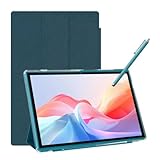
The NOVOJOY 10-inch tablet is built around a simple observation: the accessories are half the purchase. It arrives with a case and a stylus included, runs Android 15, lists 8GB of RAM and 32GB of ROM with 1TB of microSD expansion, and carries the same 6,000mAh battery capacity as the COOPERS. For a reader who wants to unbox one parcel and start taking notes the same afternoon, that bundle is the product’s entire argument.
The included stylus is a capacitive one, and it is worth being precise about what that means in daily use, because the marketing language around bundled styluses is often vaguer than the hardware deserves. A capacitive stylus is a conductive tip in a pen-shaped body. It generates no signal of its own and carries no pressure or tilt information. The tablet sees it exactly as it sees a finger. That has three practical consequences: you cannot vary line weight by pressing harder, you cannot rest your palm on the screen while writing, and the ink follows your movement with the latency of the touch panel rather than the anticipation of a digitizer. For ticking boxes on a checklist, signing a form, marking a diagram or jotting a short margin note, none of that matters. For an hour of lecture notes, it does.
The case matters more than buyers expect, and it is the reason this bundle makes sense at the budget tier. A 10-inch tablet in a bag without a case is a screen waiting to be scratched or cracked, and a repair on a budget device usually costs a large fraction of the purchase price. A folding case also doubles as a stand, which changes how you use the tablet: propped at an angle on a desk, it becomes a second display for reference material while you write on paper or type on a laptop, and that is a genuinely useful role for a low-cost device.
Memory and storage follow the standard budget pattern. The 8GB RAM figure should be read with the same caution applied to every extended-memory claim in this category — check the listing for the physical RAM split before assuming it is all physical. The 32GB of ROM is small enough that a microSD card is effectively mandatory; budget for a 128GB card at the same time as the tablet, and the device goes from cramped to comfortable for a full academic year of documents.
Key specs
- Display: 10-inch class
- Operating system: Android 15
- Memory: 8GB RAM (check the listing for the physical split)
- Storage: 32GB ROM, expandable to 1TB via microSD
- Battery: 6,000mAh
- In the box: protective case and capacitive stylus
Strengths
The bundle removes the two most common reasons a budget tablet ends up unused: no protection, and no way to write on it. Everything needed to start taking notes arrives together, the battery capacity supports a full day, and the 1TB expansion ceiling means the small internal storage is a solvable problem. Android 15 keeps the mainstream note and PDF apps available, so the software side is not a limitation.
Pros
- Case and stylus included — no separate accessory purchase needed
- 6,000mAh battery matches the best capacity in the budget tier of this roundup
- 1TB microSD expansion offsets the small internal storage
- Android 15 supports mainstream note, PDF and cloud-sync apps
- The folding case doubles as a desk stand for reference use
Cons
- Capacitive stylus offers no pressure sensitivity, tilt or palm rejection
- 32GB of internal storage requires a memory card almost immediately
- 8GB RAM figure may include virtual memory — verify the physical split
- Budget-tier processor and panel are not suited to heavy multitasking
How it compares
The direct comparison is with the ATOZEE 10.1-inch tablet, which offers a very similar proposition: Android 15, a case and stylus in the box, 8GB of RAM, 32GB of ROM and 1TB of expansion. The two are close enough that the deciding factors are the screen size, at 10 inches for the NOVOJOY versus 10.1 inches for the ATOZEE, and the battery specification, where the NOVOJOY states 6,000mAh and the ATOZEE listing does not state a capacity. Against the COOPERS, the NOVOJOY trades a slightly different specification emphasis for a more complete out-of-box package. If you are buying for someone else — a student heading to university, for instance — the bundle is the safer choice because nothing is missing.
7. TABWEE 11-Inch Android 16 Tablet – Best for AI-Assisted Research and Larger Screens

The TABWEE 11-inch tablet is the largest of the mid-range Android options in this roundup, and it pairs that extra diagonal with the most generous storage configuration below the premium tier: 24GB of memory, 128GB of internal storage and Android 16 in a package that includes a keyboard. It also advertises Gemini AI 3.5 integration, which is the specification most likely to shape how you actually take notes on it.
The extra inch over a 10.1-inch tablet sounds marginal and is not. Screen area scales with the square of the diagonal, so an 11-inch 16:10 panel offers roughly 15-18% more usable surface than a 10.1-inch panel of the same shape. In practice that is the difference between a split-screen view where both panes are comfortable and one where the reference pane is too narrow to read without horizontal scrolling. If you habitually work with a source document and your notes visible simultaneously, that difference is felt every session.
The 128GB of internal storage is the other meaningful upgrade. It is double the 64GB found on the Jeazans and ECOPAD, and it changes the device’s role: instead of being a thin client that streams everything from the cloud