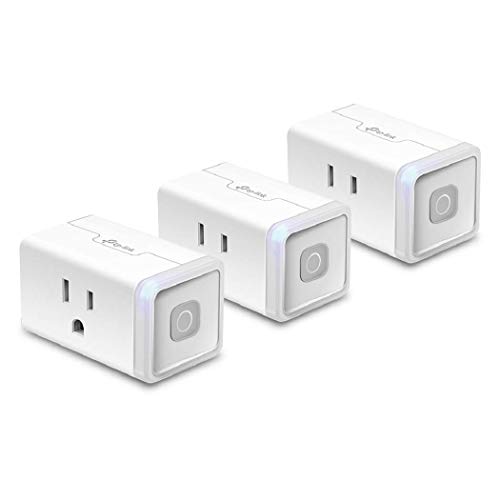
The best Alexa smart plug for most homes is a Matter-capable Wi-Fi plug such as the Kasa EP25 or Tapo P125M, because it works with Alexa today and still works if you later add Google Home or Apple Home. If you only ever use Alexa and want the simplest setup, the plain Alexa-branded smart plug from the Echo maker is the easiest to set up. Prioritise a 15 amp rating, energy monitoring only if you want it, and a 2.4 GHz Wi-Fi network.
Our top picks


As an Amazon Associate we earn from qualifying purchases at no extra cost to you.
Quick Comparison of the Best Alexa Smart Plugs in 2026
| Pick | Best for | Connection | Rating | Energy monitor | Price range |
|---|---|---|---|---|---|
| Kasa EP25 (Matter) | Best overall | Wi-Fi 2.4 GHz, Matter | 15 A / 1800 W | Yes | Budget |
| Tapo P125M (Matter) | Cheapest Matter plug | Wi-Fi 2.4 GHz, Matter | 15 A / 1800 W | No | Budget |
| Alexa-branded Smart Plug | Easiest Alexa setup | Wi-Fi 2.4 GHz | 15 A / 1800 W | No | Budget |
| Kasa HS103 (multi-pack) | Best value per plug | Wi-Fi 2.4 GHz | 12 A / 1500 W | No | Budget |
| Kasa KP115 | Best energy monitoring | Wi-Fi 2.4 GHz | 15 A / 1800 W | Yes | Mid-range |
| Eve Energy (Matter) | Best premium, Thread | Thread, Matter | 10 A class | Yes | Upper-mid |
| Kasa EP40 | Best outdoor | Wi-Fi 2.4 GHz | 15 A combined | No | Mid-range |
Ratings follow typical manufacturer spec sheets; check the exact variant (US plug type, hardware version) on the listing.
Best Overall: Kasa EP25 (Matter)
The EP25 is a compact Wi-Fi plug that adds Matter support and energy monitoring. It pairs with Alexa through either the Kasa app or the Matter route, and it keeps working with other ecosystems later. The 15 amp rating covers lamps, fans and most small appliances.
Trade-off: the body is chunky enough to block the neighbouring outlet on some wall plates.
Cheapest Matter Option: Tapo P125M
Another TP-Link brand, the P125M is a no-frills Matter plug. It handles scheduling and voice control cleanly. Trade-off: no energy monitoring.
Easiest Alexa Setup: Alexa-Branded Smart Plug
If you own an Echo, the first-party plug is the least fussy: plug it in, say “set up my plug,” and it appears in the Alexa app. Trade-off: it is Alexa-centric, so moving to another ecosystem usually means buying new plugs, and it has no energy tracking.
Best Value Multi-Pack: Kasa HS103
The HS103 is a mini plug sold in two-, four- and eight-packs, which brings the cost per plug down. It is rated 12 amps, so avoid using it for space heaters or high-draw tools. Trade-off: no Matter and no energy monitoring.
Best for Energy Monitoring: Kasa KP115
The KP115 reports how much power the plugged-in device uses over time. It is useful for finding which gadget costs the most to leave on standby.
Best Premium: Eve Energy (Matter over Thread)
Eve’s plug uses Thread, a low-power mesh network, which can mean faster, more reliable local control when you have a Thread border router (many Echo and Apple devices act as one). Trade-off: it needs a compatible router, and it costs more than Wi-Fi plugs.
Best Outdoor: Kasa EP40
Weather-resistant with two independently switched outlets, it suits holiday lights and patio fans. Keep the connection point sheltered and check the ingress rating on the spec sheet.
How to Choose an Alexa Smart Plug
- Matter vs non-Matter: Matter is a cross-brand standard. It future-proofs your purchase and lets local control work even if a company’s cloud goes offline.
- Load rating: add up wattage. A 1500 W plug fits a lamp and fan together but not a 1500 W heater with other devices.
- Size: compact plugs leave neighbouring sockets usable.
- Wi-Fi band: most plugs need 2.4 GHz. If your router merges bands, setup can fail until you separate them.
- Safety: never power a heating appliance through a smart plug unless it is rated for it, and use certified (UL or equivalent) products.
Worked Example: What a Plug Saves
An old lamp using 60 W for 6 hours a day draws 0.36 kWh. At an electricity rate of 0.15 per kWh, that is about 0.054 a day, or about 20 a year. A plug on a schedule cutting that to 3 hours halves it. A plug is not a big money saver; the real benefit is convenience, plus switching off standby power from set-top boxes and chargers.
Decision Guide
| Your situation | Pick |
|---|---|
| Alexa only, want simple | Alexa-branded plug |
| Might switch assistants | Kasa EP25 or Tapo P125M |
| Need many plugs cheaply | Kasa HS103 multi-pack |
| Want energy stats | Kasa KP115 |
| Outdoor lights | Kasa EP40 |
Setting Up a Smart Plug With Alexa: Step by Step
- Plug it in and wait for the light. Most plugs blink to show they are in pairing mode, which means they are ready to join your Wi-Fi.
- Use the brand’s app or the Alexa app. Matter plugs can be added through Add Device and a code on the plug. Non-Matter plugs usually need their own app, then a skill link.
- Join the 2.4 GHz band. Most plugs cannot connect to 5 GHz. Keep your phone on 2.4 GHz during setup if the app complains.
- Name it clearly. Bedroom lamp is easier for Alexa than Plug 1. Avoid names that sound alike.
- Create a routine. Schedule on and off times, or tie the plug to a sunset trigger. This is where plugs save the most effort.
What Not to Plug In
Smart plugs are for low-risk loads. Avoid space heaters, cooking appliances, irons, and anything with a heating element unless the maker explicitly allows it. Avoid devices that need a manual restart after power loss, such as some coffee makers, and sensitive electronics like desktop PCs where a hard power cut could corrupt files. For a sump pump or medical device, never rely on a smart plug at all.
Troubleshooting Common Problems
- Plug offline in the app. Check the router and move the plug closer for a trial. A mesh extender often fixes a dead spot.
- Alexa says the device is not responding. Re-link the skill, or remove and re-add the device in the Alexa app.
- Setup fails repeatedly. Turn off any VPN on your phone, and check that the router is not blocking new devices.
- Matter pairing code rejected. Reset the plug by holding the button and try again within the pairing window.
Keep firmware updated through the maker’s app, since updates often improve connection stability and Matter compatibility. Safety marks such as UL or ETL show independent certification, which is worth checking on bargain unbranded plugs.
Frequently Asked Questions
Do I need a hub for Alexa smart plugs?
No for Wi-Fi plugs; they connect through your router. Thread-based plugs need a Thread border router, which many Echo speakers include.
Can a smart plug turn a dumb device smart?
Yes, for devices that start working when power is applied, such as lamps and fans. It will not work on gear that needs a button press to restart after power loss.
Why does my plug keep going offline?
The common causes are a weak 2.4 GHz signal, router band-steering and firmware updates. Move the plug closer or add a mesh node.
Are smart plugs safe for space heaters?
Generally no unless the plug is explicitly rated for the heater’s wattage. Heaters draw near the plug’s limit, so most guides advise plugging them directly into a wall socket.
What is Matter?
Matter is an industry standard supported by Alexa, Google Home and Apple Home that lets devices work across platforms and often locally without the cloud.