The best webcams for most people are the Logitech MX Brio for premium work calls, the Logitech C920s Pro for a dependable budget upgrade, the Elgato Facecam Mk.2 for streaming image quality, and the Insta360 Link 2 when automatic framing matters more than price.
Our top picks
 Logitech Brio 101 Full HD 1080p Webcam
- Compatible with Nintendo Switch 2’s new GameChat mode
- Auto-Light Balance: RightLight boosts brightness by up to…
- Privacy with a Slide: The integrated webcam cover…
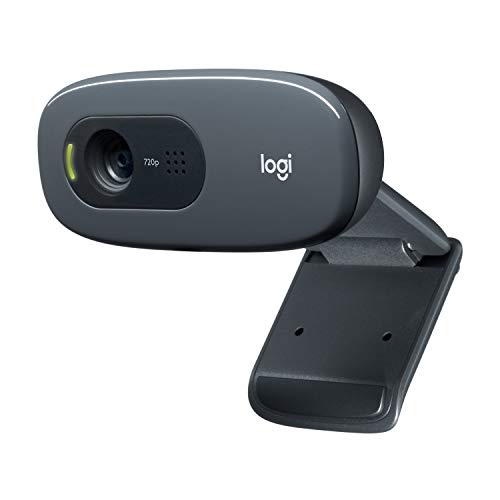 Logitech C270 720p Webcam Plug-and-Play Wide Screen
- Compatible with Nintendo Switch 2’s new GameChat mode
- Crisp HD 720p/30 fps video calls with diagonal…
- The built-in noise-reducing mic makes sure your voice…
 EMEET C960 1080P Webcam with Microphone
- 1080P Webcam with Cover for Video Calls -…
- Built-in 2 Omnidirectional Mics - EMEET webcam with…
- Automatic Light Adjustment - Automatic exposure adjustment is…
| Product | Key specs | |
|---|---|---|
| Logitech Brio 101 Full HD 1080p Webcam | Compatible with Nintendo Switch 2’s new GameChat mode Auto-Light Balance: RightLight boosts brightness by up to… Privacy with a Slide: The integrated webcam cover… | Check price |
| Logitech C270 720p Webcam Plug-and-Play Wide Screen | Compatible with Nintendo Switch 2’s new GameChat mode Crisp HD 720p/30 fps video calls with diagonal… The built-in noise-reducing mic makes sure your voice… | Check price |
| EMEET C960 1080P Webcam with Microphone | 1080P Webcam with Cover for Video Calls -… Built-in 2 Omnidirectional Mics - EMEET webcam with… Automatic Light Adjustment - Automatic exposure adjustment is… | Check price |
 Logitech C920x HD Pro PC Webcam Full | Compatible with Nintendo Switch 2’s new GameChat mode HD lighting adjustment and autofocus: The Logitech webcam… Advanced capture software: Easily create and share video… | Check price |
As an Amazon Associate we earn from qualifying purchases at no extra cost to you.
Quick picks by situation
- Best overall for meetings and remote work: Logitech MX Brio, with sharp 4K video, strong automatic exposure and a privacy shutter.
- Best budget webcam: Logitech C920s Pro HD, a sensible 1080p choice for occasional calls and basic streaming.
- Best for streaming: Elgato Facecam Mk.2, especially when you want a clean image and plan to use a separate microphone.
- Best for creators who move around: Insta360 Link 2, whose motorized gimbal can follow and reframe you.
- Best low-light premium option: Razer Kiyo Pro Ultra, with a large 1/1.2-inch sensor and strong background separation.
What matters when choosing among the best webcams?
Resolution is only the starting point
1080p is enough for most video meetings because services such as Zoom, Microsoft Teams and Google Meet commonly compress video and may not deliver a full 4K stream to every participant. A good 1080p webcam with accurate exposure can look better than a cheap 4K model.
Choose 4K when you crop into a presentation, record tutorials, stream at high quality, or want extra flexibility for digital zoom. A 4K image contains roughly four times as many pixels as 1080p, giving editing software more room to crop. The trade-off is higher storage, USB bandwidth and computer-processing requirements.
Autofocus helps, but it is not always desirable
Autofocus is valuable if you regularly hold documents or products up to the camera. For a fixed desk setup, a reliable fixed-focus or smoothly controlled autofocus system can look more professional because it avoids visible focus hunting. Streamers who sit at a consistent distance often prefer a camera with manual focus or a focus lock.
Low-light correction affects everyday usability
Webcam software can brighten a dim room, but it cannot fully replace a larger sensor or a light placed in front of you. Look for a camera that preserves skin tones without turning shadows gray and does not create excessive noise. A small desk lamp positioned behind the webcam and aimed toward your face usually produces a larger improvement than upgrading from one 1080p webcam to another.
Microphone quality is convenient, not always broadcast-grade
Built-in microphones are suitable for short meetings in a quiet room. They usually struggle with keyboard noise, fans and reflective walls. For streaming, podcasts, webinars or frequent client calls, use a USB microphone or headset and treat the webcam microphone as a backup.
Head-to-head comparison
| Webcam | Maximum video | Frame rates | Focus and framing | Microphones | Approx. market range |
|---|---|---|---|---|---|
| Logitech C920s Pro HD | 1080p | 30 fps | Autofocus; fixed field of view | Stereo | $50–$80 |
| Logitech MX Brio | 4K | 30 fps at 4K; 60 fps at 1080p | Autofocus; digital crop and Show Mode | Dual beamforming | $150–$200 |
| Elgato Facecam Mk.2 | 4K | 30 fps at 4K; 60 fps at 1080p | Fixed focus; adjustable field of view | None built in | $130–$180 |
| Razer Kiyo Pro Ultra | 4K | 30 fps at 4K; 60 fps at 1080p | Autofocus; wide field of view | Stereo | $200–$300 |
| Insta360 Link 2 | 4K | 30 fps at 4K; 60 fps at 1080p | Autofocus; motorized gimbal and tracking | Dual noise-canceling | $180–$250 |
Which webcam should you buy?
Logitech MX Brio: best for demanding remote workers
The MX Brio is the strongest all-rounder for people who spend much of the week in meetings but also want a camera capable of recording sharp video. Its 4K sensor, HDR support, automatic exposure controls and privacy shutter cover the practical requirements of a home office. The Show Mode feature can aim the camera downward toward a desk, which is useful for demonstrating paperwork or physical objects.
It is a better fit than the Facecam Mk.2 if you need autofocus and a built-in microphone. It is less compelling if you already own lighting, a dedicated microphone and a camera that will remain fixed in one position.
Logitech C920s Pro HD: best for a limited budget
The C920s Pro remains a safe choice for basic video calls because 1080p is widely supported and its image is familiar to most conferencing software. It includes a physical privacy cover and stereo microphones. Its limitations are more obvious in a dark room: exposure can become noisy, autofocus is less refined than on newer premium models, and there is no 4K crop room.
Choose it for occasional meetings, school calls or a second computer. If you have daily client calls, the extra cost of better low-light performance and exposure control is easier to justify.
Elgato Facecam Mk.2: best for a separate-mic streaming setup
The Facecam Mk.2 is designed around image control rather than all-in-one convenience. Its fixed-focus approach suits a streamer who stays in a known position, while 4K capture, 60fps 1080p and adjustable image settings provide room to tune the look. It has no built-in microphone, so budget for a USB microphone or headset.
This camera is a particularly good choice for creators who want consistent framing and do not want autofocus to shift toward a microphone, prop or hand. It is less suitable for a shared household computer where different users sit at different distances.
Razer Kiyo Pro Ultra: best when the room is difficult
The Kiyo Pro Ultra’s large sensor is its main advantage. It can retain more detail and produce cleaner results in a dim room than many small-sensor webcams, although a front-facing light is still worthwhile. Its wide view can include more of the background, and its background blur can make a home office look less distracting.
It is a strong streaming and video-call option for users who want a more camera-like image without moving to a mirrorless camera. Its size and price make it excessive for occasional meetings.
Insta360 Link 2: best for presenters and shared spaces
The Link 2 uses a motorized gimbal to track a speaker and reframe the image. That makes it useful for teaching, demonstrations, standing presentations and desks shared by multiple people. Tracking can also be disabled when a stable shot is preferable.
Movement introduces another variable: the camera may reframe at an inconvenient moment, and the gimbal needs clear space. Buy it for presentation flexibility, not simply because it has a 4K label.
Decision matrix
| Your situation | Best match | Why | What to compromise on |
|---|---|---|---|
| Budget under $100, occasional calls | Logitech C920s Pro | Reliable 1080p image and privacy cover | Weaker dim-room performance |
| Daily meetings, fixed desk, no external mic | Logitech MX Brio | 4K detail, autofocus and built-in microphones | Higher cost than needed for simple calls |
| Streaming several times per week | Elgato Facecam Mk.2 | Manual image control and 60fps 1080p | Requires a separate microphone |
| Dark room or background separation | Razer Kiyo Pro Ultra | Large sensor and strong image controls | Bulky and comparatively expensive |
| Standing presentations or moving speakers | Insta360 Link 2 | Gimbal tracking and automatic framing | Moving parts and occasional tracking errors |
Setup steps that improve any webcam
- Put the lens at eye level. Raise a laptop camera or mount the webcam on a monitor. This avoids the unflattering upward or downward angle created by a desk-level lens.
- Face a window or lamp. Place the brightest light in front of you, not directly behind your head. Diffuse a harsh lamp with a lampshade or bounce it off a nearby wall.
- Leave a little headroom. Frame your eyes near the upper third of the image, with enough space above your hair but not a large empty ceiling area.
- Set exposure before sharpness. If your face is too dark, correct the light or exposure first. Increasing sharpening will make noise and skin texture more obvious.
- Use the highest practical USB connection. For 4K cameras, connect directly to the computer when possible rather than through an overloaded hub. Close unused video applications if the camera drops frames.
- Test the microphone separately. Listen for fan, keyboard and room echo. A webcam can produce an acceptable picture while its microphone remains distracting.
Ownership, cleaning and common mistakes
The part most likely to cause trouble is not the sensor but the lens surface. Dust, fingerprints and cleaning residue reduce contrast and can make autofocus appear unreliable. Disconnect the webcam, blow away loose dust, then wipe the lens gently with a clean microfiber cloth. Avoid spraying cleaner directly onto the camera.
Keep a privacy shutter closed when the camera is not in use, and check whether a software update has reset image settings. Do not place a bright monitor directly behind you, rely on digital zoom as a substitute for moving the camera closer, or assume 4K automatically improves a compressed meeting feed.
A simple value calculation can clarify the purchase: if a $180 webcam is used for three work calls per week over two years, that is about 312 calls, or roughly $0.58 per call before considering recording and streaming use. For a person making only two calls per month, a $70 1080p model may be the more sensible choice.
Bottom line
Buy the Logitech MX Brio if work calls are your priority and you want one camera that also records well. Choose the Logitech C920s Pro when price matters most. Pick the Elgato Facecam Mk.2 for a controlled streaming desk with a separate microphone, the Razer Kiyo Pro Ultra for a difficult lighting environment, and the Insta360 Link 2 for presentations or speakers who move around.