The best benchtop CNC machines for most home workshops are the Shapeoko 5 Pro for general-purpose cutting, Onefinity Woodworker X-50 for larger or tougher work, Bantam Tools Desktop CNC Milling Machine for precise small parts, and Genmitsu 4040-PRO for the lowest-cost entry point.
Our top picks
 FoxAlien XE-Ultra 8080 CNC Router Machine with
- Mega-Scale 33"x33"x4.72" Workspace: Tackle ambitious projects with a…
- Industrial Rigidity & Precision: Equipped with 16mm ball…
- 2.6 N.m Closed-Loop Stepper Motors: Featuring 60-86mm closed-loop…
 FoxAlien Masuter Pro 3-Axis CNC Router Machine
- All-Aluminum Structure & Enhanced Stability: Engineered with an…
- Upgraded Dust-Proof Controller & User-Friendly Design: Features a…
- Versatile Spindle Compatibility & Customization: Includes two spindle…
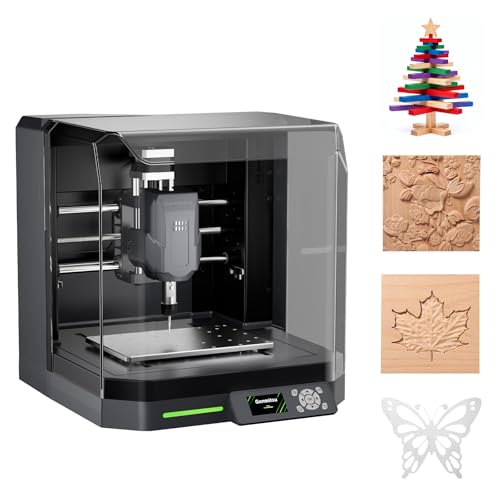 Genmitsu Cubiko Desktop CNC Router Machine with
- Skip the lengthy assembly of traditional CNC kits
- The integrated enclosure helps contain chips and debris…
- Spend less time manually finding the Z-zero point
| Product | Key specs | |
|---|---|---|
| FoxAlien XE-Ultra 8080 CNC Router Machine with | Mega-Scale 33"x33"x4.72" Workspace: Tackle ambitious projects with a… Industrial Rigidity & Precision: Equipped with 16mm ball… 2.6 N.m Closed-Loop Stepper Motors: Featuring 60-86mm closed-loop… | Check price |
| FoxAlien Masuter Pro 3-Axis CNC Router Machine | All-Aluminum Structure & Enhanced Stability: Engineered with an… Upgraded Dust-Proof Controller & User-Friendly Design: Features a… Versatile Spindle Compatibility & Customization: Includes two spindle… | Check price |
| Genmitsu Cubiko Desktop CNC Router Machine with | Skip the lengthy assembly of traditional CNC kits The integrated enclosure helps contain chips and debris… Spend less time manually finding the Z-zero point | Check price |
 FoxAlien XE-Ultra Core Desktop CNC Router Machine | Industrial Rigidity & Precision Powerful 2.6 N·m Closed-loop Steppers Flexible Open-spindle Ecosystem | Check price |
As an Amazon Associate we earn from qualifying purchases at no extra cost to you.
Best benchtop CNC machines at a glance
| Machine | Approx. work area | Cutting system | Best materials | Typical 2026 price range | Workshop requirement |
|---|---|---|---|---|---|
| Shapeoko 5 Pro | About 28 × 28 × 4 in on the 2×2 version | 65 mm router; optional spindle upgrades | Wood, plastics, aluminum with suitable feeds | $2,000–$3,000 | Sturdy bench, dust collection, roughly 4 × 4 ft footprint |
| Onefinity Woodworker X-50 | About 32 × 32 × 5 in, depending on configuration | Router or optional water-cooled spindle | Wood, plastics, composites, occasional aluminum | $2,000–$3,500 | Rigid bench or stand; generous clearance around the rails |
| Bantam Tools Desktop CNC Milling Machine | About 7 × 9 × 3.5 in | High-speed integrated milling spindle | Aluminum, brass, plastics, wax, hardwood | $4,000–$6,000 | Compact, enclosed-style workstation with chip management |
| Carbide 3D Nomad 3 | About 8.25 × 8.25 × 3 in | Integrated 130 W spindle | Wood, plastic, PCB material, wax, light aluminum | $2,500–$3,000 | Desk-sized space; minimal assembly |
| Genmitsu 4040-PRO | About 15.7 × 15.7 × 3 in | 300 W router-style spindle | Wood, acrylic, plastics, engraving materials, light aluminum | $500–$900 | Small bench, dust shoe or enclosure strongly recommended |
Published dimensions vary by wasteboard, spoilboard, dust shoe, and machine configuration. Treat these figures as planning numbers rather than the exact maximum envelope of every package.
Our picks by workshop situation
| Your situation | Best match | Why | Main compromise |
|---|---|---|---|
| First CNC, mostly signs and furniture parts | Shapeoko 5 Pro | Large cutting area, mature software, straightforward router setup | Needs a strong bench and serious dust collection |
| Frequent woodworking and maximum rigidity | Onefinity Woodworker X-50 | Rigid linear-motion design and useful Z clearance | Less compact and often requires more owner-supplied setup |
| Small metal parts and repeatable engraving | Bantam Tools Desktop CNC | Compact milling format, controlled workflow, metal-friendly construction | Small work area and high purchase price |
| Small apartment or limited bench space | Carbide 3D Nomad 3 | Compact footprint and relatively low setup burden | Cannot handle cabinet panels or large signs |
| Budget under $1,000 | Genmitsu 4040-PRO | Useful cutting area for the money and a large community of users | More calibration, noise, and upgrade work than premium machines |
Head-to-head comparison
Shapeoko 5 Pro: the strongest all-round woodworking choice
The Shapeoko 5 Pro is the most balanced option when the machine must produce signs, trays, joinery parts, guitar components, templates, and furniture-sized subassemblies. Its aluminum extrusion frame, supported motion components, and 65 mm router mount provide substantially more capacity than compact engraving machines.
It cuts plywood, hardwood, MDF, HDPE, acrylic, and other plastics well. Aluminum is possible, but it requires conservative depth of cut, sharp tooling, secure workholding, and careful chip evacuation. A trim router is convenient and inexpensive to replace, but it is louder and less controlled than a dedicated variable-speed spindle.
Carbide 3D’s Carbide Create software is approachable for 2D signs and pockets, while more advanced users can move to other CAM programs that export compatible toolpaths. Assembly is moderate rather than instant: expect to build the frame, install the gantry, square the machine, fit the wasteboard, and calibrate motion. A 2×2 configuration still needs a bench larger than the cutting area because the controller, clamps, dust shoe, and cable movement require extra room.
Onefinity Woodworker X-50: for a larger, more rigid home setup
The Onefinity Woodworker X-50 is attractive when cutting quality and rigidity matter more than a compact footprint. Its rail-based motion system and substantial Z-axis clearance suit thick lumber, spoilboard surfacing, and repeated woodworking jobs. It is commonly paired with a router, although spindle packages can improve speed control and reduce brush wear.
Onefinity does not remove the need for a proper CNC table. The machine must be supported on a flat, rigid surface, and the workpiece needs a reliable clamping or vacuum strategy. It is also a better candidate than a small desktop engraver for long boards and large carvings, but it is not a production metal mill. Aluminum work is limited by the router-style cutting system and the open-frame design.
Expect more assembly and configuration decisions than with an enclosed desktop machine. The reward is a scalable platform with a generous work envelope. Budget separately for a table, wasteboard, clamps, router or spindle, bits, and dust collection.
Bantam Tools Desktop CNC: the specialist for small precision parts
The Bantam Tools Desktop CNC Milling Machine is the unusual choice in this group because it is designed more like a small mill than a large-format woodworking router. Its compact work area is a major limitation for signs, but an advantage for brackets, fixtures, front panels, prototypes, and small aluminum parts.
It can work aluminum, brass, plastics, wax, and selected woods when the tooling and feeds are appropriate. Its guided software workflow helps users define stock, tooling, and toolpaths without building a complex software stack from scratch. That convenience is valuable for schools, product designers, and hobbyists making repeatable small parts.
The machine costs more than its size suggests. You are paying for a rigid, controlled desktop milling workflow rather than square inches of cutting area. Chip collection, workholding, and tool selection still matter; an enclosure or carefully managed chip tray does not make metal chips harmless to nearby electronics.
Carbide 3D Nomad 3: the easiest compact option
The Nomad 3 makes sense when available space is the deciding factor. It fits on a substantial desk and arrives with far less mechanical assembly than an open-frame router CNC. The enclosed design helps contain some chips and makes the machine more approachable in a shared workshop, although it does not eliminate dust or noise.
Its small work area suits jewelry-scale pieces, plaques, PCB isolation routing, carving blanks, and small plastic or hardwood components. Light aluminum work is possible with appropriate tooling and conservative settings, but the Nomad is not a replacement for a larger router CNC or a rigid metal mill.
Carbide Create provides a relatively smooth path from drawing to cutting. The trade-off is capacity: a 12-inch sign or a large cabinet component must be divided into multiple setups, which introduces alignment work and additional opportunities for registration errors.
Genmitsu 4040-PRO: the low-cost learning platform
The Genmitsu 4040-PRO offers a useful middle ground for beginners who want more than a tiny engraving area without spending several thousand dollars. Its approximately 15.7 × 15.7-inch work area handles coasters, small signs, plaques, templates, and model parts.
The 300 W spindle-style cutter is suitable for wood, acrylic, plastics, and engraving materials. Light aluminum cuts may be possible, but the machine’s open frame and modest spindle power demand shallow passes, strong clamping, and realistic expectations. It is not the right purchase for daily hardwood production or substantial metal removal.
Assembly, squaring, belt or lead-screw adjustment, and software setup are part of the ownership experience. That can be a benefit for someone who wants to learn CNC mechanics, but a poor fit for a user who needs predictable results immediately.
Work area, materials, and spindle power: what actually matters
- Work area: Size the machine around the finished workpiece, not the raw material. For a 24-inch sign, a 15.7-inch machine requires at least two indexed setups; a 28-inch-capable machine can usually cut it in one operation.
- Materials: Router CNCs excel at wood and plastics. Aluminum needs rigidity, short tool stick-out, lubrication or chip control, and much shallower passes. Steel generally calls for a proper metal mill rather than a home router CNC.
- Spindle power: More watts do not automatically mean better cuts. Rigidity, runout, speed control, tooling, and feeds matter just as much. A high-speed trim router removes wood quickly but is loud; a variable-speed spindle is quieter and better suited to controlled cutting.
- Accuracy: Advertised resolution is not the same as finished-part accuracy. Backlash, frame flex, tool deflection, stock movement, and incorrect steps-per-millimeter settings usually dominate real results.
- Software: Choose the complete workflow: design, CAM, machine control, probing, and post-processor support. Carbide Create is friendly for common 2D work; Easel is popular with beginner-oriented router workflows; Fusion is more capable for complex 3D and mechanical parts but takes longer to learn.
Space, dust, and ownership costs
Plan for more than the machine’s advertised footprint. A 28-inch work area can require roughly 48 × 48 inches once the frame, controller, laptop, dust hose, clamps, and operator access are included. Leave room to load stock from the front and to reach the emergency stop.
A shop vacuum and dust shoe are essential for wood. Fine MDF dust can enter bearings, switches, and electronics, while chips can interfere with limit switches and spoilboard surfacing. Vacuum the spoilboard and rails after each dusty job, keep cables away from moving parts, and periodically inspect belts, couplers, V-wheels or bearings, router brushes, and collets.
A useful ownership calculation is the cost of a supposedly $700 entry machine. Add approximately $100–$250 for bits and clamps, $100–$250 for dust control, and $100–$300 for a table, wasteboard, and spoilboard hardware. The usable starting cost can therefore reach $1,000–$1,500 before failed-material costs and software subscriptions. Premium machines cost more upfront but may reduce the time spent correcting alignment and troubleshooting motion.
Assembly and first-cut checklist
- Build the frame on a flat surface and check that the diagonals match before tightening fasteners.
- Install and surface the wasteboard so the cutting plane is parallel to the machine’s motion.
- Secure the router or spindle with minimal tool stick-out; excessive stick-out increases deflection.
- Calibrate X, Y, and Z movement, then verify the emergency stop and limit switches.
- Run an air cut above the material to confirm origin, travel limits, clamps, and toolpath direction.
- Begin with conservative feeds and shallow passes, recording successful settings for each material and bit.
Which one should you buy?
Choose the Shapeoko 5 Pro if you want the best overall balance for a home woodworking workshop. Choose the Onefinity Woodworker X-50 if you have room for a more substantial setup and expect frequent, demanding work. Choose the Bantam Tools Desktop CNC for small precision parts, especially aluminum. Choose the Nomad 3 when compact size and simple setup outweigh cutting capacity. Choose the Genmitsu 4040-PRO when price is the priority and you are willing to learn calibration and maintenance as part of the hobby.