Best laptop stands under $50: the short answer
The best laptop stands under $50 depend on whether you need a fixed-height riser, a folding travel stand, or an adjustable arm: choose the Nulaxy C3 for a stable desk setup, the Lamicall Adjustable Laptop Stand for frequent height and angle changes, or the Nexstand K2 if portability matters most. Prices vary by retailer and sale, but all are commonly available below $50.
Before buying, check your laptop’s screen size and weight against the stand’s stated limits, then compare the working height, base footprint, and folded size. “Adjustable” can mean a small tilt change or a full screen-height lift; those are not interchangeable.
Our top picks
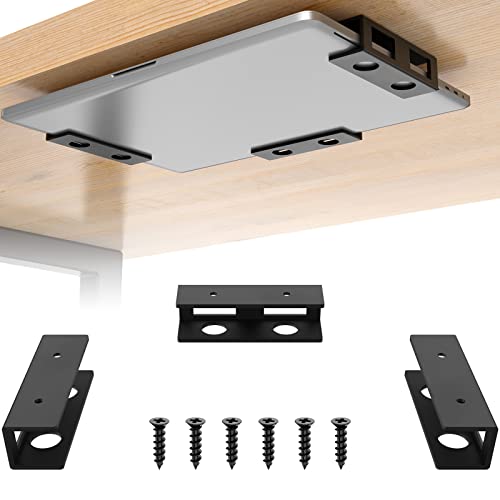 FOROIRON 3 PCS Under Desk Laptop Mount
- Function: Our under desk laptop mount design for…
- Anti-scratch slip Felt Board: The under desk laptop…
- High Quality: This under desk laptop holder mount…
 ELETIUO Wall & Under Desk Laptop Mount
- Universal Compatibility&Adjustable Design: This wall mount fits for…
- Dual Mounting Options for Versatility: Choose between strong…
- Anti-Scratch Protection & Accessible Ports: Equipped with anti-scratch…
As an Amazon Associate we earn from qualifying purchases at no extra cost to you.
Compare the main options
| Stand | Style and adjustment | Published size or capacity | Best fit | Trade-off |
|---|---|---|---|---|
| Nulaxy C3 | Fixed-height aluminum riser; no height adjustment | Designed for laptops roughly 10–17 inches; two-piece design | One desk, one preferred screen height | Its raised platform is not a compact travel solution |
| Lamicall Adjustable Laptop Stand | Adjustable aluminum desk stand; height and angle change | Common versions fit laptops around 10–17 inches; exact limits vary by model | Shared desks or users who reposition their screen | Hinges need to be set firmly; a raised laptop takes more vertical space |
| Nexstand K2 | Folding, multi-position riser | About 0.23 lb (105 g); commonly specified for laptops up to 17 inches and 20 lb (9 kg) | Commutes, travel, and packing light | Narrow supports and a light frame require careful placement |
| Amazon Basics Ventilated Adjustable Laptop Stand | Mesh platform with adjustable height and tilt | Platform is approximately 14 × 12 inches; check the specific listing for weight limits | A ventilated, broad platform at a low price | Larger footprint than folding stands; height range is more limited than an arm-style riser |
| Generic aluminum folding stand | Compact, usually with several tilt positions | Often supports 10–15.6-inch laptops; dimensions and capacity vary by model | A tight budget and occasional use | Quality of joints, rubber pads, and stated capacity varies considerably |
Specifications can differ between revisions and regional listings. Confirm the exact model’s dimensions and capacity before ordering, especially for a 16- or 17-inch laptop. A screen-size claim alone does not guarantee that a deep chassis or unusually heavy gaming laptop will sit securely.
Which stand suits your setup?
For a permanent desk: Nulaxy C3
A fixed stand is the simple choice if you work at the same desk and already know the height you want. The C3’s rigid, open-frame design leaves space beneath the laptop for small accessories and allows air to circulate around the chassis. Its lack of moving joints is an advantage for stability, but a disadvantage if you regularly switch between sitting and standing or share the desk.
Measure before buying: the laptop’s feet need to land fully on the platform, and the stand’s base must fit behind your keyboard without crowding your mouse area. The C3 raises the screen, but it does not bring the keyboard closer. For long typing sessions, plan to use a separate keyboard and mouse rather than reaching up to type on the elevated laptop.
For changing desk heights: Lamicall Adjustable Laptop Stand
An adjustable desk stand makes more sense if multiple people use the workstation or you change your chair and desk position during the day. It lets you set the display higher and angle it toward your eyes, and its wide platform can feel reassuring with a larger laptop. The hinges are the critical part: set them on a level surface and make sure both sides are equally engaged before placing the computer.
Expect some trade-off between adjustability and effortless repositioning. A joint stiff enough to hold a laptop can take deliberate force to move. If you change the angle many times a day, a lightweight folding stand may be less fussy, though it may offer less precise height control.
For commuting: Nexstand K2
The K2 is the clear portability pick: at about 105 grams, it is much lighter than a solid aluminum desk riser and folds down for a bag. Its multiple height settings make it more useful than a simple tilt wedge when you work in different places. The light frame is not a reason to skip setup checks, however. Open it fully, confirm the locking positions, and place the laptop’s feet within the supports before typing.
For a heavy laptop, a machine with an unusually wide base, or a desk that wobbles, a broader metal stand may feel more secure. The K2’s compact footprint also means it is worth testing the laptop’s balance before using it near the edge of a small table.
For a low-cost, ventilated platform: Amazon Basics
The Amazon Basics ventilated model offers a broad mesh surface and adjustable tilt without requiring a foldable travel frame. That can suit a home desk where the stand can stay put. Its roughly 14-by-12-inch platform is a useful reminder to check the whole footprint, not just the laptop’s width: a stand can fit the computer and still take up too much room beside a notebook, keyboard, or mouse.
A quick fit and stability check
- Measure the laptop base: Check width and depth, including any feet or protruding corners. Compare those with the stand’s support surface, not only its advertised screen-size range.
- Check the load: Look up your laptop’s weight and leave a sensible margin below the stand’s stated capacity. Capacity is not a substitute for a stable, centered placement.
- Test the desk footprint: Reserve space for the stand, the laptop, and your external keyboard and mouse. A raised display is less useful if the keyboard ends up cramped.
- Set the height before typing: Adjust the stand first, then position the keyboard so your shoulders can stay relaxed and your wrists are not forced upward.
- Check movement: With the laptop centered, type lightly and tap the desk. If the screen bounces noticeably, lower the stand, tighten its joints if designed to be tightened, or choose a wider base.
As a practical comparison, the K2 weighs about 105 grams, while an aluminum desk riser is typically several times heavier. That difference matters on a commute, but less on a desk where the stand stays in place. The lighter option wins on carrying weight; the heavier, broader one often wins on a reassuring planted feel.
What wears out—and how to avoid it
On adjustable stands, joints and hinge friction are usually the parts to watch. Repeatedly forcing a stiff hinge, carrying a stand while it is partly open, or loading it off-center can loosen the mechanism over time. On folding stands, inspect the locking points and rubber contact pads; worn or missing pads can let the laptop slide or scratch against the support. Fixed stands have fewer moving parts, but their rubber strips can still peel or collect dust.
Clean metal and rubber with a soft, lightly damp cloth, then dry them before putting the stand away. Avoid abrasive cleaners and solvents that could damage the finish or loosen adhesive pads. Do not assume that an open-frame stand will solve a laptop’s overheating: keep its vents unobstructed, and follow the laptop maker’s guidance if the computer runs hot.
Choose by situation
| Your situation | Best starting point | Why |
|---|---|---|
| One desk, rarely adjusted | Nulaxy C3 | Rigid structure and no hinge to reset |
| Shared desk or changing work position | Lamicall Adjustable Laptop Stand | More control over height and viewing angle |
| Frequent travel, light bag | Nexstand K2 | Folds compactly and weighs about 105 g |
| Low-cost home setup with room to spare | Amazon Basics Ventilated Laptop Stand | Broad mesh platform and adjustable tilt |
| Lowest price, occasional use | A folding stand with documented dimensions and load limit | Can work well if its joints and support points suit your laptop |
Bottom line
For a stable, everyday desk, start with the Nulaxy C3; for more control over screen height and angle, choose the Lamicall; for commuting, the Nexstand K2 is the most portable option here. The most useful stand under $50 is the one that fits your laptop’s base, stays steady at your chosen height, and leaves enough space for a separate keyboard and mouse. Check the exact model’s current price and specifications, since versions and retailer listings can change.